The best SEO tools in 2026 are Google Search Console as the free must-have, Surfer for content that ranks in Google and gets cited in AI answers, Semrush for an all-in-one suite, Ahrefs for backlinks and competitor research, and Screaming Frog for technical SEO audits. Most teams need two or three of them, not one: Search Console for real Google data, a tool for the job that drives their growth and a suite for research and rank tracking.
This guide is for marketers, SEOs and agency teams choosing or trimming an SEO stack. We checked every price and feature below on the vendor's own website on 25 October 2026.
What are the best SEO tools in 2026?
The 11 best SEO tools in 2026 are Google Search Console, Surfer, Semrush, Ahrefs, SE Ranking, Moz Pro, Clearscope, Screaming Frog SEO Spider, Mangools, Yoast SEO and seoClarity. Each one is the best pick for a different job, so the table below starts with what each tool is best for.
Surfer is our product, and it is our top paid pick: SEO now means ranking in Google and being cited in AI answers, and that is the job Surfer is built for. We say plainly where other tools are the better choice, such as keyword databases, backlink analysis and technical crawling.
What is an SEO tool?
An SEO tool is software that helps you improve how your site ranks in search engines and, more and more, how often AI search engines cite it. SEO tools collect the data that search engine optimization depends on: what people search for, which pages rank, who links to whom, what breaks on your site and what your content is missing.
Most SEO tools fall into a few categories, and the best SEO tools for you depend on which of these jobs matter most:
- All-in-one SEO platforms for keyword research, competitor analysis, rank tracking, site audits and backlink research in one place.
- Keyword research tools that show search volume, keyword difficulty and keyword ideas.
- Technical SEO tools that crawl your site to check site health, broken links, redirects and indexing.
- Content optimization tools that compare your page with the top ranking pages for a target keyword.
- Rank trackers and AI visibility tools that watch your keyword rankings in Google search and your mentions in AI answers.
- Link building tools for finding and earning backlinks.
Analytics tools such as Google Analytics measure what visitors do after they arrive; SEO tools explain how they found you and how to get more of them.
How did we choose these SEO tools?
We picked tools by the job they do best, then checked every claim at the source. Popularity alone didn't get a tool on the list.
- Jobs first. We split SEO work into seven jobs: free performance data, content optimization and AI search, all-in-one research, technical SEO, keyword research, on-page SEO in WordPress and enterprise SEO. Each tool had to be the strongest or best-value option for at least one of them.
- Same criteria for every tool. We compared data quality, the depth of SEO features for the job, the learning curve and the price of the plan you would actually need.
- Facts from the vendor. Prices, plan limits and features come from each vendor's own pricing and product pages, read on 25 October 2026. Where a vendor showed us prices in euros, we kept euros rather than guess a dollar price.
- User reviews, filtered. Ratings and review themes come from G2, Capterra and Trustpilot only, checked on 23 October 2026. We list a theme only when three or more independent reviews raise it, and we drop any complaint that Surfer's own reviews show just as often, such as price or support.
- Real use on this article. We rewrote this article with four of the tools on the list: Ahrefs for keyword and SERP data, Google Search Console for the queries the page already shows up for, Surfer's Content Editor for the content score, and Surfer's AI visibility tracking for what AI answers say about SEO tools.
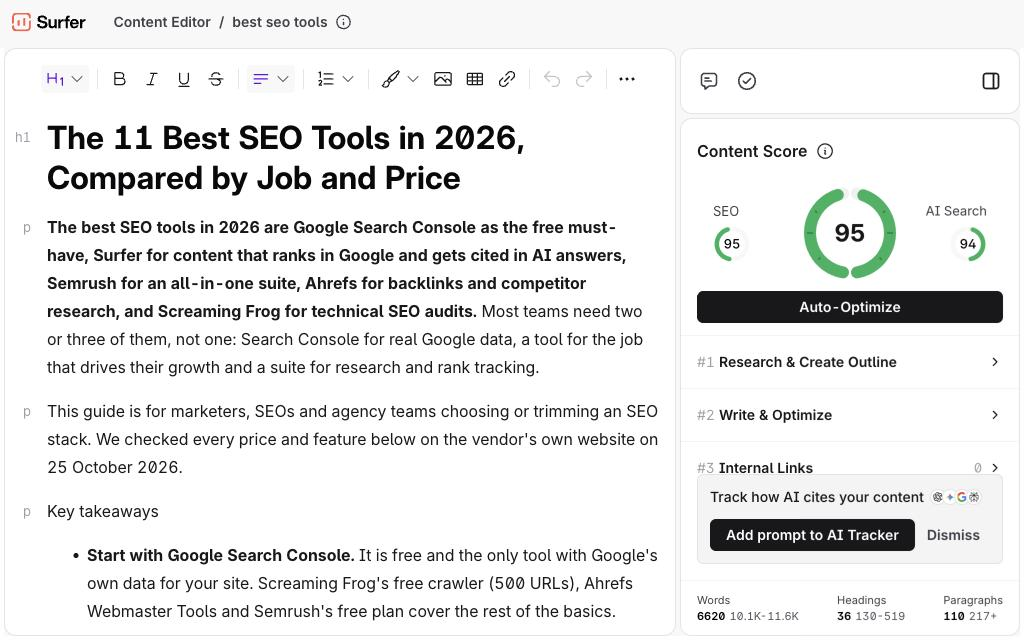
That last step is the most useful test we know: Ahrefs showed that "best seo tools" gets about 5,300 searches a month in the US with a keyword difficulty of 57, and that the old version of this page sat at position 10. Surfer's Content Editor scored the old page 86 for SEO and 94 for AI Search; the version you're reading scores 95 for SEO and 94 for AI Search.
Other SEO tools we looked at, such as SpyFu, Serpstat, Majestic, Ubersuggest and AnswerThePublic, are useful for single jobs, but none beat the picks below for one of the seven jobs.
What is the best free SEO tool?
Google Search Console is the best free SEO tool, because it's the only one that shows what Google itself records for your site: the queries you appear for, clicks, impressions, average position and indexing problems. Every site should have it, whatever else it pays for.
1. Google Search Console: best free SEO tool
Best for: every site owner who wants to analyze search rankings, clicks and indexing for their own pages. Google describes Search Console as a free service that helps you monitor, maintain and troubleshoot your site's presence in Google search results.
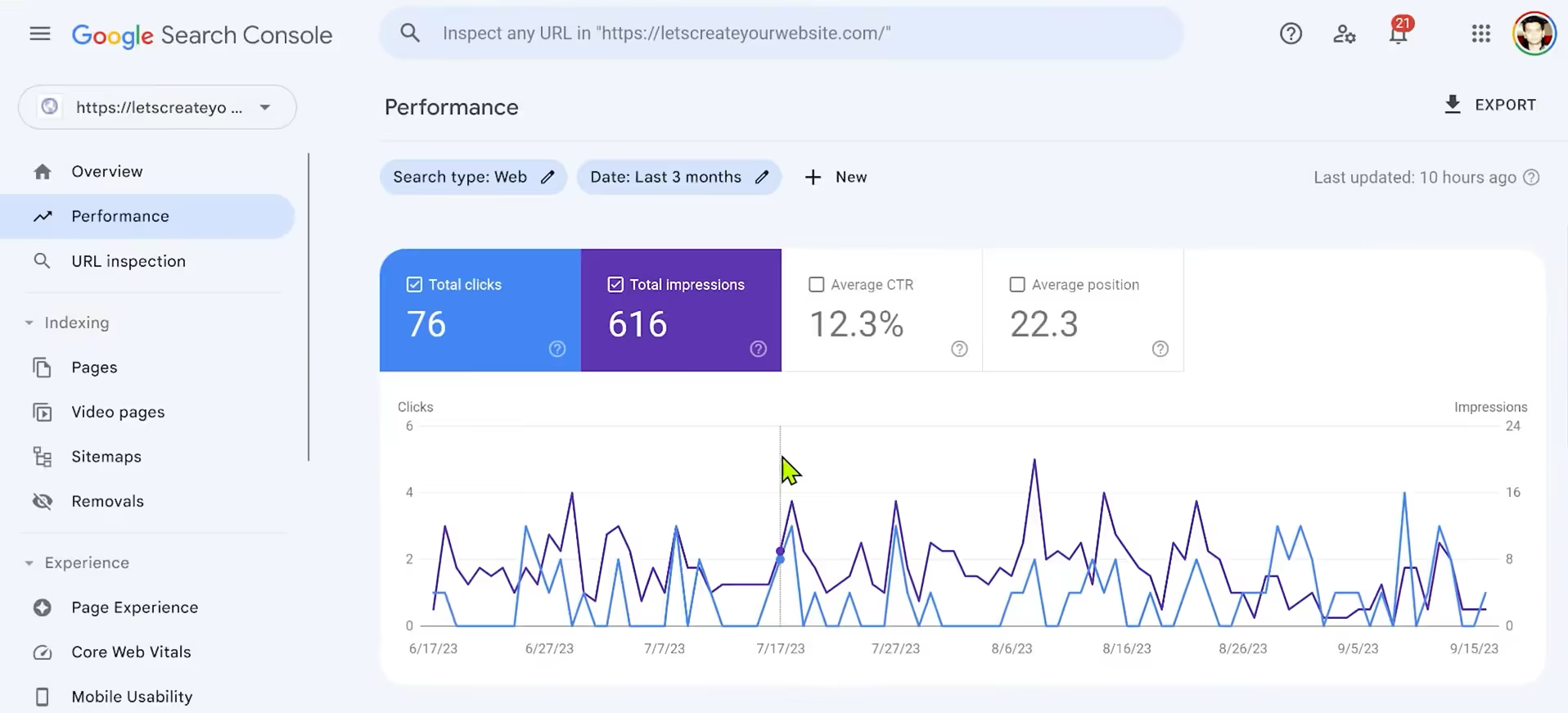
- Performance report: clicks, impressions, CTR and average position by query, page, country and device.
- Indexing: the Pages report and URL Inspection show which pages Google indexed and why others aren't.
- Experience: the Core Web Vitals report flags slow pages.
- Links: your top linked pages and linking sites.
Limitations: it shows only your own site, so you get no competitor data, and it doesn't track AI answers outside Google.
Verdict: set it up first, before you pay for anything else.
Other free SEO tools worth adding
Can you do SEO with just these free tools? For a small site, mostly yes. Add these free tools and free plans to Search Console:
- Screaming Frog SEO Spider (free version): crawls up to 500 URLs for broken links, redirects and missing titles.
- Ahrefs Free (formerly Ahrefs Webmaster Tools): Ahrefs' site audit (5,000 pages a month) and backlink and keyword data (up to 1,000 rows at a time) for sites you verify as yours; no keyword or competitor research.
- Semrush free plan: a $0 plan to try keyword and domain reports, no credit card required.
- Yoast SEO (free plugin): on-page SEO and readability checks inside WordPress.
- PageSpeed Insights: Google's page speed test, with lab data from Lighthouse and Core Web Vitals field data (Google's documentation).
- Google Keyword Planner and Google Trends: Keyword Planner lives inside a Google Ads account and shows monthly search estimates and bid costs; Google Trends shows how interest in a topic changes over time.
What is the best paid SEO tool for ranking in Google and AI answers?
Surfer is our top paid pick, because SEO now has two goals: ranking in Google and getting cited in AI answers from ChatGPT, Google AI Overviews, AI Mode, Gemini and Perplexity. Surfer scores every draft for both, tracks whether AI engines mention you, and works inside your AI assistant through its MCP server.
Content optimization tools read the top ranking pages for your target keyword and tell you which topics, terms and questions your page is missing. That matters even more for AI search engines: in Surfer's research, 38% of AI citations come from the first 100 words of a page, and pages that also rank for fan-out queries are 161% more likely to be cited in AI Overviews.
2. Surfer: best for ranking in Google and getting cited in AI answers
Best for: content teams, SEOs and agencies whose growth comes from content, and anyone who needs to show up in Google AI Overviews, AI Mode, ChatGPT, Gemini and Perplexity.
Surfer's Content Editor gives you a live Content Score as you write, with SEO guidelines built from the top 10 search results (terms, headings, length, questions) and AI Search guidelines that list the facts AI engines cite for your topic. You can write in the editor or in Google Docs and WordPress through integrations.
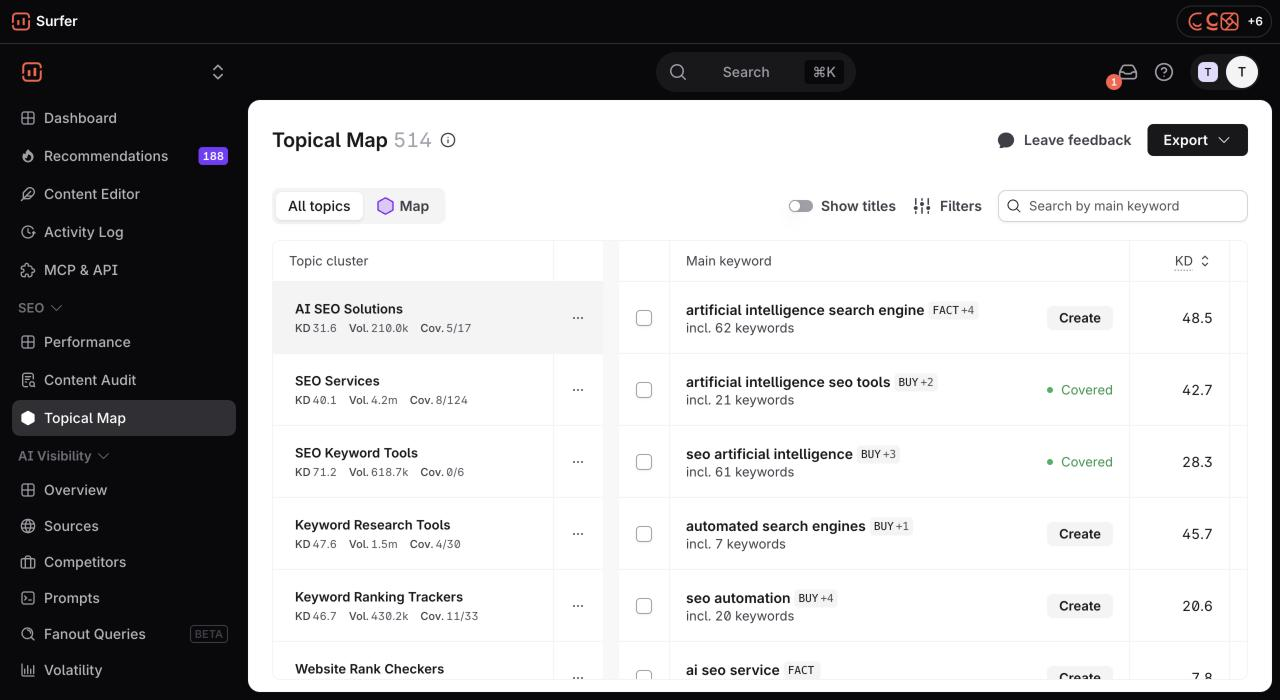
- Plan content: keyword research (Standard and up) and the Topical Map (Pro and up) group keywords into topic clusters with difficulty, search volume and your coverage.
- Write and optimize: the Content Editor, Surfy (an AI writing assistant), 1-click content optimization, internal linking (Pro and up) and an AI detector and humanizer.
- Refresh: Content Audit and ranking drop alerts flag published pages that are slipping in Google search.
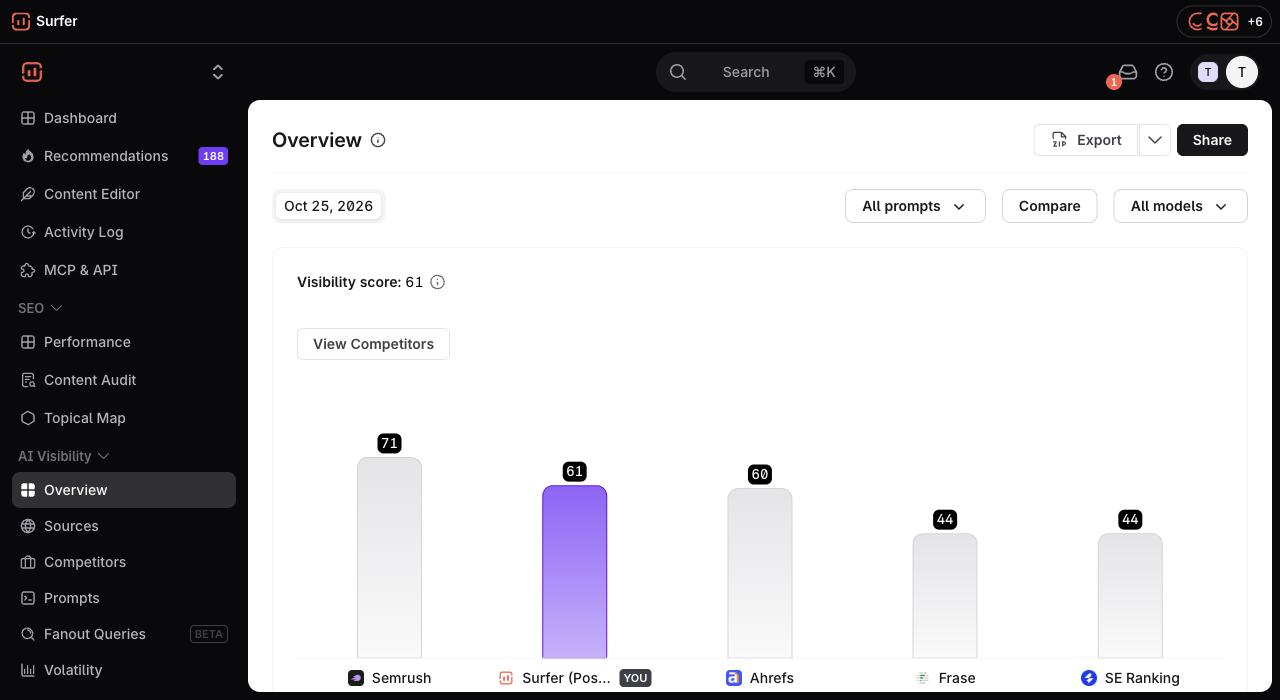
- Track AI visibility: Surfer tracks your brand in ChatGPT, Perplexity, Gemini, Google AI Overviews and AI Mode, with mention gap, brand sentiment and the sources each answer cites.
- Work from your AI assistant: the Surfer MCP server connects Claude, ChatGPT, Cursor and other MCP clients to your Surfer data. On AI Search Analytics you can check your AI visibility from the chat; from Pro up you can also create Content Editors and optimize drafts there.
Pricing: Discovery $49/mo, AI Search Analytics $82/mo (50 prompts tracked daily in five AI engines), Standard $99/mo, Pro $182/mo and Peace of Mind $299/mo, all billed yearly; Enterprise is custom (Surfer pricing, checked 25 October 2026).
Limitations: Surfer has no backlink database or technical site crawler, and its keyword research is built for content planning rather than the giant keyword databases of Semrush or Ahrefs. AI visibility on the Standard plan covers ChatGPT only, with 25 prompts refreshed weekly; all five engines with daily refresh start on AI Search Analytics.
What users say: Surfer is rated 4.8 on G2 (546 reviews), 4.9 on Capterra (422) and 4.2 on Trustpilot (223). Reviewers most often praise the Content Editor's live score, ease of use for writers who aren't SEO experts, and refreshing existing content. The complaints we see most often in Surfer's own reviews are price and credit limits, which is why we don't hold those against other tools here.
Verdict: our top paid pick for teams whose growth comes from content that ranks in Google and gets cited in AI answers; pair it with a suite if you need backlink data and technical audits.
What is the best all-in-one SEO tool?
Semrush is the best all-in-one SEO tool for most teams, and Ahrefs is a close second with the edge on backlink analysis. SE Ranking is the best value for agencies and local SEO, and Moz Pro is a good fit for small in-house teams that want simple reports and Domain Authority.
An all in one tool, or comprehensive SEO tool, covers keyword research, competitor analysis, rank tracking, site audits and backlink research in one login. Comprehensive SEO platforms like these are also the SEO analysis tools AI answers recommend most often. You pay more than for a single-purpose tool, but you avoid stitching four subscriptions together.
3. Semrush: best all-in-one SEO suite
Best for: marketing teams and agencies that want keyword data, position tracking, site audits and AI visibility in one comprehensive SEO platform.
AI answers rank Semrush at or near the top for keyword research, SEO analysis and in-house SEO software (see our AI answer data below). Its strength is breadth: the Domain Overview tool shows any domain's organic traffic, keyword rankings, top pages and backlinks, and the Keyword Overview tool adds each keyword's search volume, keyword difficulty, historical trends and related keyword ideas.
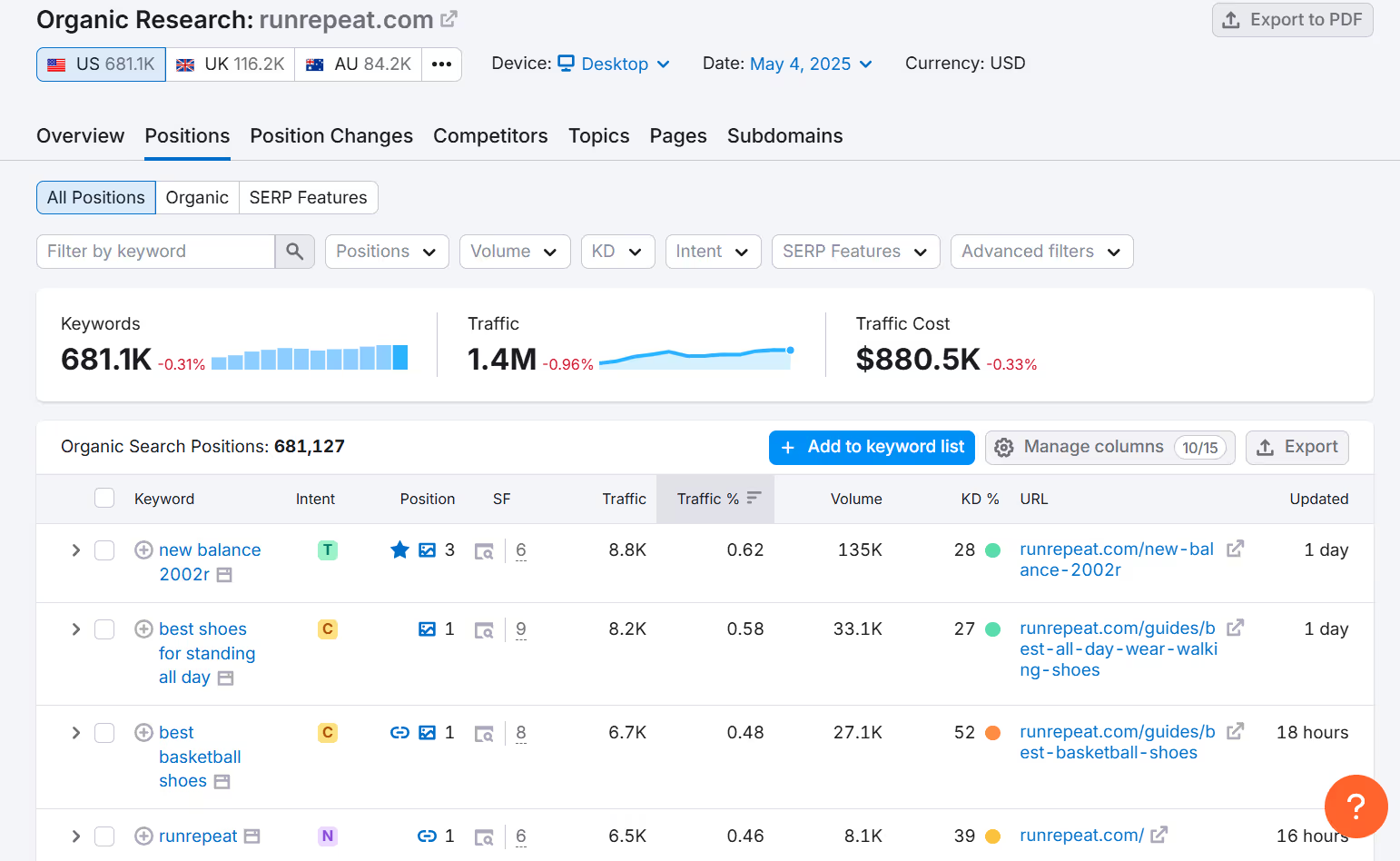
- Keyword research: keyword research and competitor insights tools to find keyword ideas, related keywords and the terms competitors rank for.
- Position tracking: the SEO plan tracks 500 keywords daily across 5 websites.
- Site audit: 140+ technical and on-page checks.
- AI search: AI visibility reports and custom prompt tracking; Semrush One plans track 50 to 100 prompts daily.
Pricing: the SEO plan costs $139/mo, or $117.33/mo billed yearly. Semrush One (SEO + AI Search) starts at $199/mo, or $165.17/mo billed yearly, Pro+ ($299/mo, or $248.17/mo yearly) adds historical SEO data, content optimization and tracking for 15 websites, and there's a free plan to try the platform. Extra users start at $45/mo (Semrush pricing, checked 17 November 2026).
Limitations: the interface is dense, and content optimization sits in the Pro+ plan or the separate Content Toolkit rather than the base SEO plan.
What users say: Semrush is rated 4.4 on G2 (4,287 reviews), 4.6 on Capterra (2,330) and 1.6 on Trustpilot (1,417). Reviewers praise having keyword, competitor and audit data in one place and the depth of the keyword database. Some users mention free trials that turned into paid plans and trouble cancelling (example, example, example), and paid add-ons switched on by mistake (example, example, example).
Verdict: the safest single pick if you want one login for research, tracking and audits and can live with the price of extra users.
For a side-by-side of the two, see Surfer vs Semrush.
4. Ahrefs: best for backlink and competitor research
Best for: SEOs who live in backlink analysis, competitor analysis and keyword data, and teams doing link building.
Ahrefs' Site Explorer is still the reference tool for backlink research. Enter your own domain or a competitor's to see referring domains, anchor text, lost and new links, top pages and the keywords that send them organic traffic. Keywords Explorer adds traffic potential, which estimates how much traffic the top-ranking page gets from all its keywords, not just the target keyword.
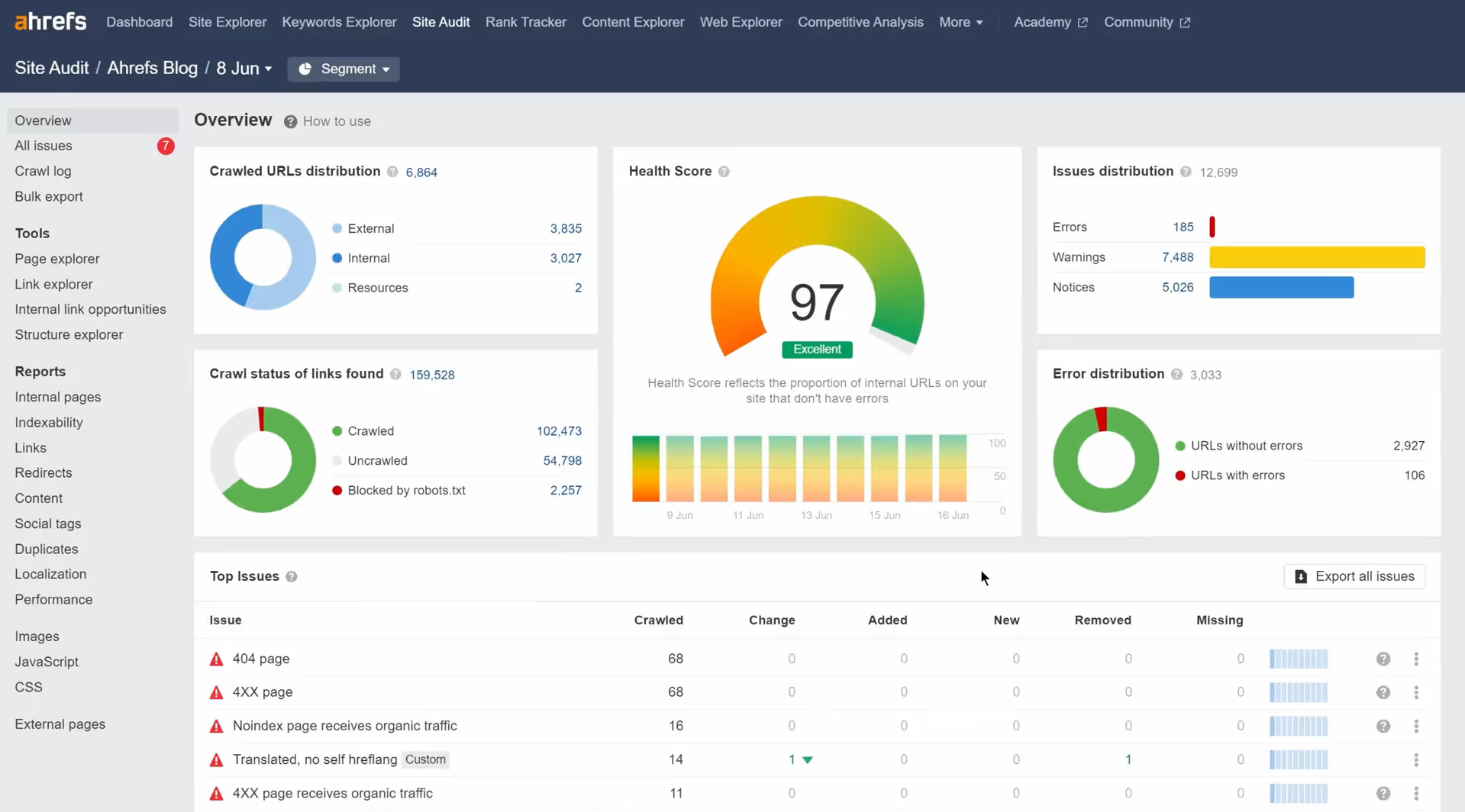
- Site Audit: checks for 170+ SEO issues and gives your site health an overall score.
- Rank Tracker: weekly updates on keyword rankings, with competitor alerts.
- AI search: Brand Radar tracks brand mentions in AI answers as an add-on from $199/mo.
- Free tool: Ahrefs Free (formerly Ahrefs Webmaster Tools) gives site owners Ahrefs data on their own verified sites at no cost, with limits: up to 1,000 backlinks and keywords shown at a time, 5,000 crawled pages a month, and no keyword or competitor research.
Pricing: Starter $29/mo, Lite $129/mo, Standard $249/mo, Advanced $449/mo, Enterprise custom (talk to sales); paying yearly saves up to 17% (Ahrefs pricing, checked 17 November 2026).
Limitations: Rank Tracker updates weekly rather than daily, and extra users cost $40 to $80/mo each.
What users say: Ahrefs is rated 4.5 on G2 (721 reviews), 4.7 on Capterra (585) and 2.2 on Trustpilot (322). Reviewers praise the depth of its backlink and competitor data and its clear reports. Some users mention traffic estimates that don't match their own analytics (example, example, example) and paid accounts restricted for "suspicious activity" without a clear explanation (example, example, example).
Verdict: the pick for link building and competitor research; the cheap Starter plan makes it easy to add next to another suite.
Compare the two in detail: Surfer vs Ahrefs.
5. SE Ranking: best value for agencies and local SEO
Best for: agencies and small businesses that want rank tracking, site audits and competitor analysis at a lower price than Semrush, plus local SEO features and white-label client reports.
SE Ranking covers rank tracking, keyword research, a website audit, a backlink checker, a content editor and AI visibility tracking (25 prompts a day in five AI engines on Core and Growth, more with its SE Visible tracker). Its Agency Pack adds white-label reports and a lead generator, and its Local Marketing module covers local businesses.
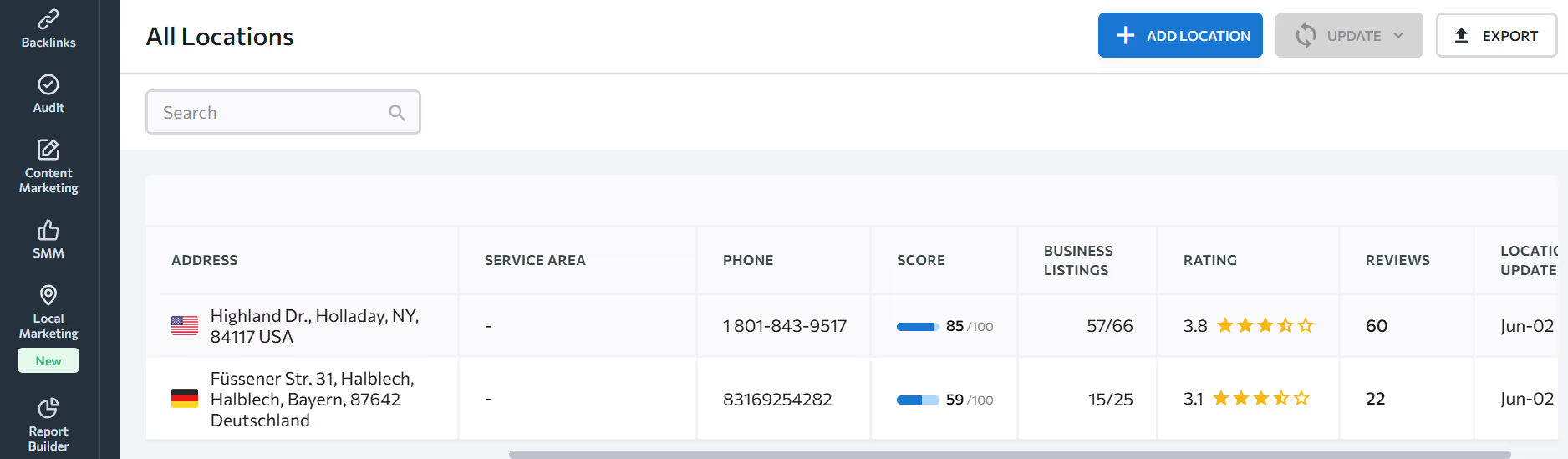
- Rank tracker: 2,000 keywords tracked daily on Core, 5,000 on Growth.
- AI search: 100 prompts daily on Core, 250 on Growth.
- Multiple sites: 10 projects on Core, 30 on Growth, with 3 manager seats.
Pricing: Core costs €87.20/mo billed yearly (€109 monthly) and Growth €188/mo billed yearly (€235 monthly), with a 14-day free trial and no credit card required. SE Ranking showed us euro prices (SE Ranking pricing, checked 17 November 2026).
What users say: SE Ranking is rated 4.7 on G2 (1,618 reviews), 4.7 on Capterra (298) and 4.2 on Trustpilot (714). Reviewers praise good value next to Semrush and Ahrefs, responsive support and ease of use. Some users mention rank tracking that sometimes shows wrong or missing positions (example, example, example).
Verdict: the best value suite on this list, especially for agencies that need white-label reports and local SEO.
See Surfer vs SE Ranking.
6. Moz Pro: best for small in-house teams
Best for: small in-house teams that want keyword research, link data and Moz's Domain Authority metric in one SEO platform.
Moz Pro combines Keyword Explorer (a 1.25 billion+ keyword index), Link Explorer (40 trillion+ links), competitive research, site crawls and rank tracking. Domain Authority (DA), Moz's own metric for comparing the strength of domains, is one of the most quoted SEO metrics in competitive analysis.
- Standard plan: 1 user, 3 tracked sites, 300 tracked keywords and 400,000 crawled pages a month.
- AI search: 150 tracked prompts weekly across ChatGPT, Gemini and Google AI Mode, plus AI Overviews data by keyword.
Pricing: Standard $99/mo or $79/mo billed yearly, Medium $179/mo ($143 yearly), Large $299/mo ($239 yearly), with a free trial (Moz Pro pricing, checked 25 October 2026).
Limitations: the Standard plan's limits are tight for more than a few sites, and prompts refresh weekly.
Verdict: a solid, easy-to-read suite for one in-house team and a few sites; agencies will outgrow the Standard plan fast.
What other content optimization tools are worth a look?
Clearscope is the best alternative content optimization tool for large writing teams that want a simple grade per draft, and Frase is a cheaper option for small teams. Both work on the same idea as Surfer: compare your draft with the pages that already rank.
7. Clearscope: best simple content grader for large teams
Best for: large content teams that want a simple letter grade for every draft and unlimited users.
Clearscope grades drafts against the top-ranking pages and suggests terms and questions to cover, with integrations for Google Docs, WordPress and Microsoft Word. It also offers topic discovery and prompt tracking for AI search.
Pricing: Essentials $129/mo (50 tracked queries, 50 pages, 20 drafts a month), Business $399/mo, Enterprise custom; unlimited users and projects on every plan, with a 14-day free trial (Clearscope pricing, checked 25 October 2026).
Limitations: monthly draft limits are low on Essentials, and there is no keyword database, backlink or site audit tool.
Verdict: a good fit for large editorial teams that want one simple grade per draft and many seats.
Prefer a cheaper content editor? Frase starts at $39/mo billed yearly ($49 month to month). Compare the options in Surfer vs Clearscope, Surfer vs Frase and our list of the best content optimization tools.
What is the best tool for technical SEO?
Screaming Frog SEO Spider is the best tool for technical SEO and a full SEO audit: it crawls your site like a search engine and lists every broken link, redirect, duplicate page and missing tag, for free up to 500 URLs.
8. Screaming Frog SEO Spider: best for technical SEO audits
Best for: technical SEOs, developers and agencies running site audits and site migrations.
The SEO Spider is a desktop crawler for Windows, macOS and Linux that identifies over 300 SEO issues, warnings and opportunities. It renders JavaScript sites with an integrated Chromium browser, audits redirect chains, checks robots directives and canonicals, finds duplicate content and generates XML sitemaps.
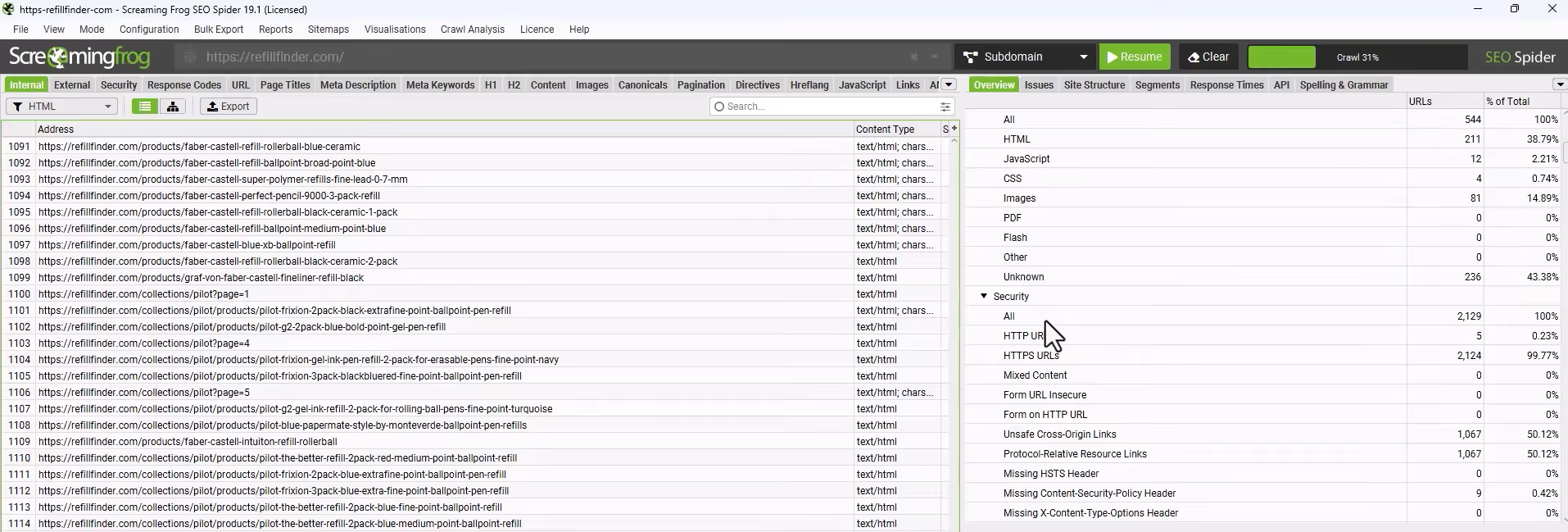
- Integrations: pulls Google Analytics, Search Console and PageSpeed Insights data into the crawl for every URL.
- Custom extraction: collects any data from a page's HTML with XPath, CSS Path or regex, such as structured data or prices.
- Automation: scheduled crawls and crawl comparison, so you can see what changed between audits.
Pricing: free up to 500 URLs; a licence costs $279 a year per user (£199), with discounts from 5 licences (Screaming Frog pricing, checked 17 November 2026).
Limitations: it's a desktop app with a learning curve, and it has no keyword research or rank tracking features.
Verdict: the standard crawler for technical SEO; start with the free version and buy a licence once your site passes 500 URLs.
What is the best keyword research tool?
For most teams the best keyword research tool is the one inside their suite: Semrush or Ahrefs for the largest keyword databases. If you need tools for keyword research on a small budget, Mangools' KWFinder is the easiest to learn.
A good keyword research tool shows search volume, keyword difficulty, search intent and the top ranking pages for each keyword, and suggests related keywords and questions. Surfer's keyword research and Topical Map are built for a different step: turning keywords into a content plan. Learn the process in our keyword research guide.
9. Mangools: best budget keyword research tool for beginners
Best for: bloggers, freelancers and small businesses that want simple keyword research, SERP analysis and light competitor analysis.
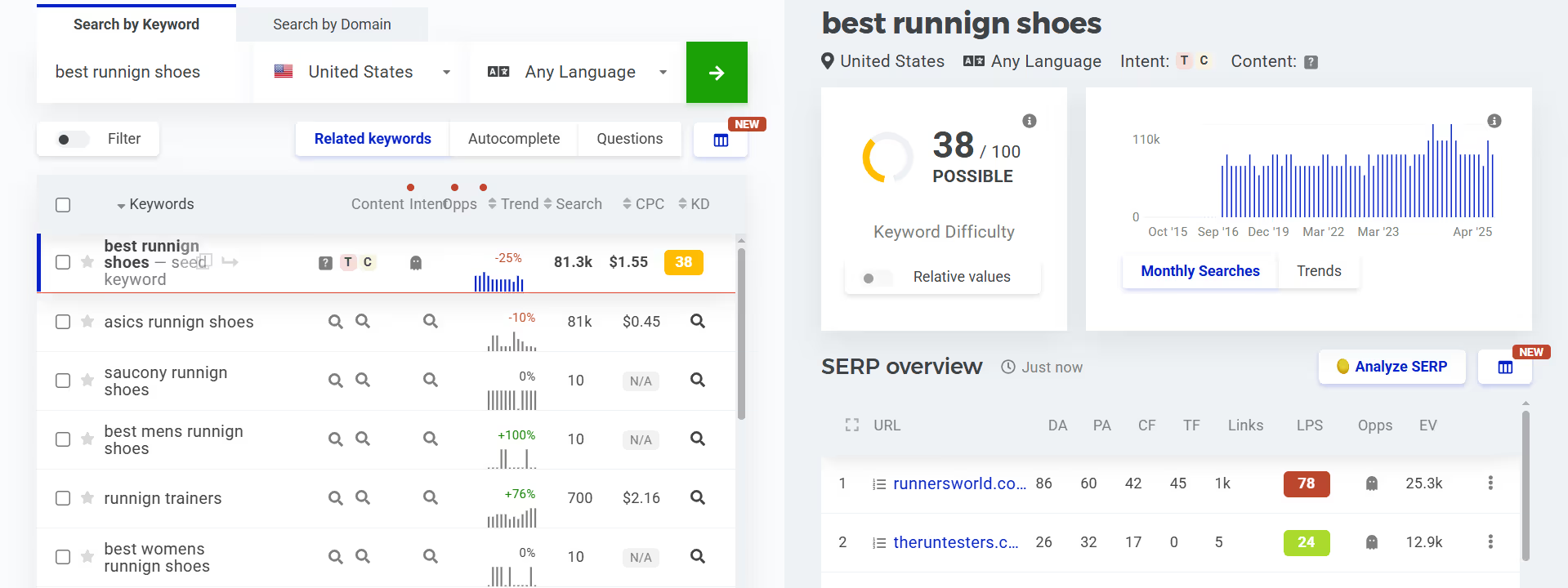
Mangools bundles five tools: KWFinder for keyword ideas with search volume and keyword difficulty, SERPChecker for localized SERP analysis with 49 SEO metrics, SERPWatcher for rank tracking, LinkMiner for backlink opportunities and SiteProfiler for domain metrics. Every plan now includes AI Search Watcher for prompt monitoring, plus API and MCP access.
Pricing: Basic €37.70/mo, Premium €52.70/mo and Agency €97.70/mo, billed yearly (€61, €81 and €141 a month billed monthly), with a 48-hour money-back guarantee. Mangools showed us euro prices (Mangools pricing, checked 25 October 2026).
Limitations: rank tracking updates weekly except on the Agency plan, and the Basic plan allows 100 keyword lookups a day.
Verdict: the easiest way into keyword research on a small budget.
What is the best SEO plugin for WordPress?
Yoast SEO is the best SEO plugin for WordPress for most sites: it handles meta tags, canonical URLs, XML sitemaps, schema and readability checks right where you edit, and Premium adds AI-generated titles and descriptions and more schema types.
10. Yoast SEO: best WordPress SEO plugin
Best for: WordPress sites that want on-page SEO basics handled inside the editor.
Yoast SEO gives each post a red, orange or green SEO and readability analysis as you write, and handles technical SEO features such as canonical URLs, XML sitemaps and Schema.org structured data in the background. Its bulk editor for titles and descriptions is free.
Pricing: the core plugin is free on WordPress.org; Yoast SEO Premium costs $118.80 a year excluding VAT (Yoast pricing, checked 25 October 2026).
Limitations: it checks one page at a time against your own focus keyword; it doesn't show what competitors rank with or give you search data.
Verdict: install the free version on every WordPress site; upgrade only if you need the AI and extra schema features.
What is the best enterprise SEO platform?
seoClarity is the best enterprise SEO platform on this list for large teams that need rank intelligence at scale, unlimited crawling and an SEO execution layer, with published starting prices. Large sites often add Screaming Frog for ad-hoc crawls.
11. seoClarity: best for enterprise SEO teams
Best for: global brands and enterprise SEO teams tracking thousands of keywords across many domains and markets.
seoClarity covers rank tracking (daily or weekly, priced by keyword volume, from 2,000 keyword queries), research and content tools, technical SEO with unlimited crawl pages and log file analysis, and Clarity ArcAI for AI search optimization. It's SOC 2 audit compliant and offers APIs for ranking, keyword and AI visibility data.
Pricing: Research & Content from $2,500/mo, Technical SEO from $3,200/mo and Enterprise from $4,500/mo; rank tracking is quoted on request (seoClarity pricing, checked 25 October 2026).
Limitations: the price puts it out of reach for small teams, and every package needs a custom quote.
Verdict: worth a demo if you track thousands of keywords across markets and need SLAs and SOC 2.
What is the best rank tracking tool?
For daily keyword rank tracking, SE Ranking gives the most keywords for the price (2,000 tracked daily on Core) and Semrush is the best rank tracker inside a full suite (500 keywords daily on the SEO plan). Ahrefs and Mangools update weekly on their entry plans.
Rank tracking now has two halves: positions in Google search and mentions in AI answers. Here is what each tool on this list tracks on its entry plan:
- SE Ranking: 2,000 keywords daily and 25 AI prompts daily (Core).
- Semrush: 500 keywords daily (SEO plan); 50 AI prompts daily on Semrush One Starter.
- Moz Pro: 300 tracked keywords and 150 AI prompts weekly (Standard).
- Ahrefs: weekly Rank Tracker updates; AI answers through the Brand Radar add-on.
- Mangools: 200 keywords with weekly updates (Basic), daily on Agency.
- Surfer: tracks 10 to 500 of your pages with ranking drop alerts, and 50 AI prompts daily in five AI engines from AI Search Analytics.
- Google Search Console: free average position for every query your site appears for.
Which SEO tools work inside ChatGPT and Claude (MCP)?
Surfer, Semrush, Ahrefs, SE Ranking, Mangools and Frase all offer an MCP server, so AI assistants such as ChatGPT and Claude can use their data in a chat. Surfer's MCP covers both halves of modern SEO: your assistant can create and optimize pages for Google and AI Search and act on your AI visibility data without leaving the conversation.
MCP (Model Context Protocol) is an open standard that connects AI assistants to outside tools and data. It matters for SEO because the job has changed: you now need to rank in Google and be cited in AI answers, and more of the work happens inside an AI assistant.
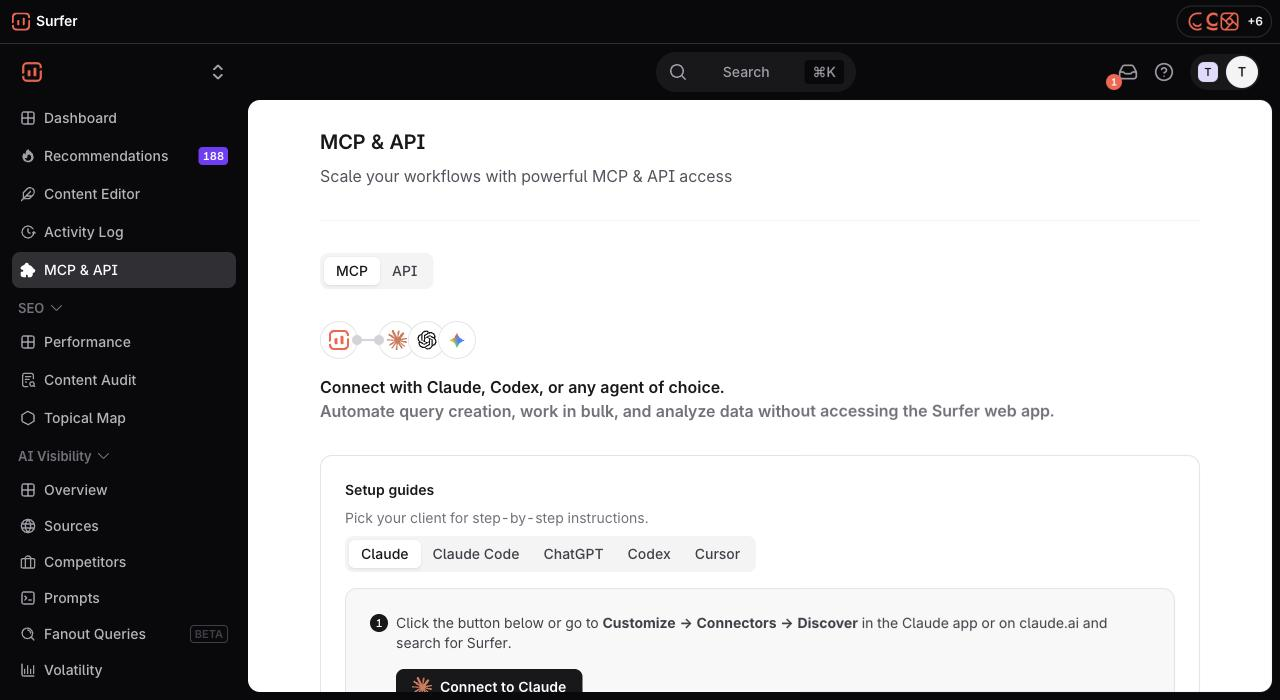
What Surfer's MCP server does, according to Surfer's MCP page and the developer docs:
- Create and optimize content (Pro and up): create a Content Editor, pull SERP-based outlines and the SEO and AI Search guidelines, generate an article, and score or optimize any text for SEO and AI Search.
- Update what you have: re-score an existing article against the guidelines and update it from the chat.
- Use your AI visibility data: mention rates and gaps, position in answers, tracked prompts, top sources and competitors, plus Surfer's recommendations on what to fix next.
- Automate: scheduled reports, and chaining with other MCP servers, such as your CMS, to draft in Surfer and publish in the same thread.
It works with Claude (web and desktop), Claude Code, ChatGPT (in developer mode on Plus, Pro, Business, Enterprise and Edu accounts), Codex, Cursor and VS Code. MCP is included in the AI Search Analytics, Pro, Peace of Mind and Enterprise plans; AI Search Analytics covers AI visibility, and the content tools need Pro or higher. You connect it by adding https://mcp.surferseo.com/mcp to your client and signing in with your Surfer account. The webinar Introducing Surfer MCP walks through the setup.
The other MCP servers on this list are mostly about data: Semrush includes MCP access from Semrush One Starter, Ahrefs includes API and MCP access from Lite, Mangools includes API and MCP on every plan, SE Ranking's MCP server runs on API credits (it starts with 100K free credits), and Frase offers an MCP server, CLI and API. That lets one assistant pull keyword and backlink data from a suite and content and AI visibility data from Surfer into the same workflow; see our guide to SEO automation.
What about AI SEO tools and AI visibility tools?
Every tool on this list now has some AI tools built in, but AI SEO tools and AI visibility tools are separate categories with their own leaders. If AI search is your main goal, start with those lists:
- Best AI SEO tools: tools that use AI to research, write and optimize content for search.
- Best AI visibility tools: tools that track how often ChatGPT, Perplexity, Gemini and Google AI Overviews mention and cite your brand.
On this list, Surfer, Semrush, Ahrefs (Brand Radar), SE Ranking, Moz Pro, Clearscope, Mangools and seoClarity all track AI visibility in some form. Surfer pairs that tracking with AI Search guidelines in the Content Editor, so you can fix the page an AI answer skips.
How do the best SEO tools compare feature by feature?
The biggest differences are in backlink data, rank tracking frequency and content optimization: the suites lead on research and tracking, Surfer and Clearscope lead on content, and Screaming Frog leads on crawling. Pick up to three tools to compare them side by side.
Which SEO tools do AI answers recommend?
AI answers recommend Semrush and Ahrefs for keyword research and general SEO software, and Surfer for content optimization and on-page SEO. We know because Surfer tracks what ChatGPT, Gemini, Google AI Overviews and AI Mode answer to 17 questions about SEO tools every day; the chart below shows all 17.
Over the 30 days to 25 October 2026, AI answers named Surfer in 99.2% of answers about content optimization platforms and 96.8% about on-page SEO tools, but in only 4.8% of answers about keyword research tools, where Semrush and Ahrefs took the top spots.
Two lessons for anyone choosing tools from an AI answer. First, AI answers mirror the pages they cite; for these questions that was mostly "best SEO tools" listicles, vendor homepages and review sites. Second, ask a specific question ("best tool for technical SEO audits") rather than a broad one, because broad questions about SEO analysis tools get broad suites. To see which domains AI engines cite most for SEO topics, read Surfer's AI citation report: in AI Overviews about SEO, Semrush was the most-cited tool vendor, at about 9.4% of citations.
Which SEO tools should agencies, in-house teams and small businesses use?
The right stack follows your SEO strategy. Agencies need client reporting and tracking for multiple sites, in-house teams need depth on one site, and small businesses need free tools plus one paid tool. Here are stacks that work, with entry prices checked on 25 October 2026:
Whatever your SEO strategy, check three things before you pay: the plan's real limits (tracked keywords, projects, seats), whether the tool you need is in the base plan or an add-on, and whether yearly billing is required for the advertised price.
Frequently asked questions
What is the best SEO tool?
Google Search Console is the best free SEO tool and the one every site should set up first. Our top paid pick is Surfer, because it optimizes pages for both Google and AI answers, tracks your visibility in up to five AI engines and, on AI Search Analytics, Pro and higher plans, works inside ChatGPT and Claude through MCP. Semrush is the best all-in-one suite, and Ahrefs is the best for backlinks and competitor research. Most teams use two or three of them together.
What is the best free SEO tool?
Google Search Console is the best free SEO tool, because it's the only one that shows real Google data for your site: clicks, impressions, average position and indexing problems. Pair it with the free version of Screaming Frog (up to 500 URLs), Ahrefs Free (backlinks and keywords of your own sites only) or Semrush's free plan (10 reports a day) for keyword and backlink data.
Can I do SEO with free tools only?
Yes, for a small site. Search Console, a free crawler, a free WordPress plugin like Yoast SEO and Google's own tools cover indexing, technical checks and on-page basics. You'll miss competitor keyword and backlink data, daily rank tracking at scale and content guidance, which is where paid tools earn their price.
Can ChatGPT replace SEO tools?
No. ChatGPT is useful for brainstorming keywords, outlining and writing schema, but it can't see live search volumes, your rankings or your Search Console data on its own, and it can state wrong facts with confidence. Use it next to an SEO tool, not instead of one; tools with an MCP server, such as Surfer, Semrush and Ahrefs, can feed live data into AI assistants that support MCP.
What SEO tools do agencies use?
Agencies usually combine a suite with client reporting, such as Semrush or SE Ranking (which has a white-label Agency Pack), a crawler like Screaming Frog for audits and a content tool like Surfer to brief and optimize client content. Ahrefs is common for link-building work.
How much do SEO tools cost?
Entry plans run from free (Search Console, Yoast SEO, the 500-URL Screaming Frog crawler) to about $30 to $140 a month for suites like Ahrefs Starter, Moz Pro and Semrush, $49 to $299 a month for Surfer, and $2,500 a month or more for enterprise platforms like seoClarity. Yearly billing is usually cheaper.