Content optimization is the process of improving a page so it matches search intent, covers its topic in depth, and is easy for readers, search engines and AI answers to use, which helps it rank higher and get cited. In order for your web pages to rank higher in search engine results, they need to be optimized for user experience, search engines, and conversions. Optimizing content for better search engine ranking is one of the most important steps of your content workflow.
You've probably heard the term "content optimization" before. But what does that mean, exactly? And how can you optimize content for SEO? In this guide, we'll look at what content optimization is, why it's important, and give you some actionable tips to boost your rankings and increase traffic.
What is content optimization?
Content optimization is the process of improving content to make it as effective as possible. It is performed using several different approaches, from improving keyword coverage and density to adding relevant links and copywriting. Optimized content satisfies search intent, has increased SERP visibility and converts better because it’s reader-centric.
Why is content optimization important?
Optimizing your pages will help them rank higher and draw in more traffic. They will convert better, helping your business increase leads and opt-ins. Well-optimized articles are also shared more often, thus reaching wider audiences and acquiring backlinks.
Without optimizing your articles, you’ll decrease your chances of traffic and conversions from your website. In a nutshell, if traffic and search engine rankings are important to you, content optimization is important to help you achieve those things.
So important in fact, we built a couple of tools at Surfer for content writers and content marketing teams to help you optimize content for SEO.
How to optimize website content in 11 actionable steps
Here are 11 tested techniques you can take to optimize the content on your website that will help you achieve higher organic traffic and search engine rankings. We’ll begin with getting the most fundamental concepts right and build from there.
1. Perform a Content audit
Before you optimize your content, it’s important to get an idea of what kind of content you have and where it stands. That’s where a content audit comes in.
A content audit analyzes all the elements on your web page. It helps you take stock of what you have, identify any gaps in your content strategy, and find ways to improve your existing content.
In Surfer, there are two ways to do this. Content Audit covers your whole site: it reads your Google Search Console data, refreshes daily, flags ranking drops and lists the pages with the best quick-win potential. For a deep check of a single page, Audit (on the Pro plan and above) compares one URL with the pages that rank for its keyword and lists fixes such as missing terms, internal links and word count.
Auditing your articles is a great way to begin the content optimization process and improve them. A report like this will help save you a bunch of hours you can dedicate to improving your pages.
Recommended Read: A Complete Guide to Content Audit
2. Match search intent and find search volume
Identifying and then satisfying search intent is crucial because there’s no point in optimizing an article that your user doesn’t want to read. Optimizing content takes time and effort, so focus your efforts where they have the potential for maximum effect.
You can quickly identify search intent by examining the first page of your target keyword’s search results. Just type in your search query into the search bar and start analyzing the nature of queries.
For example, when you type in “SEO tools” in Google search, you’ll see something like the SERP below.
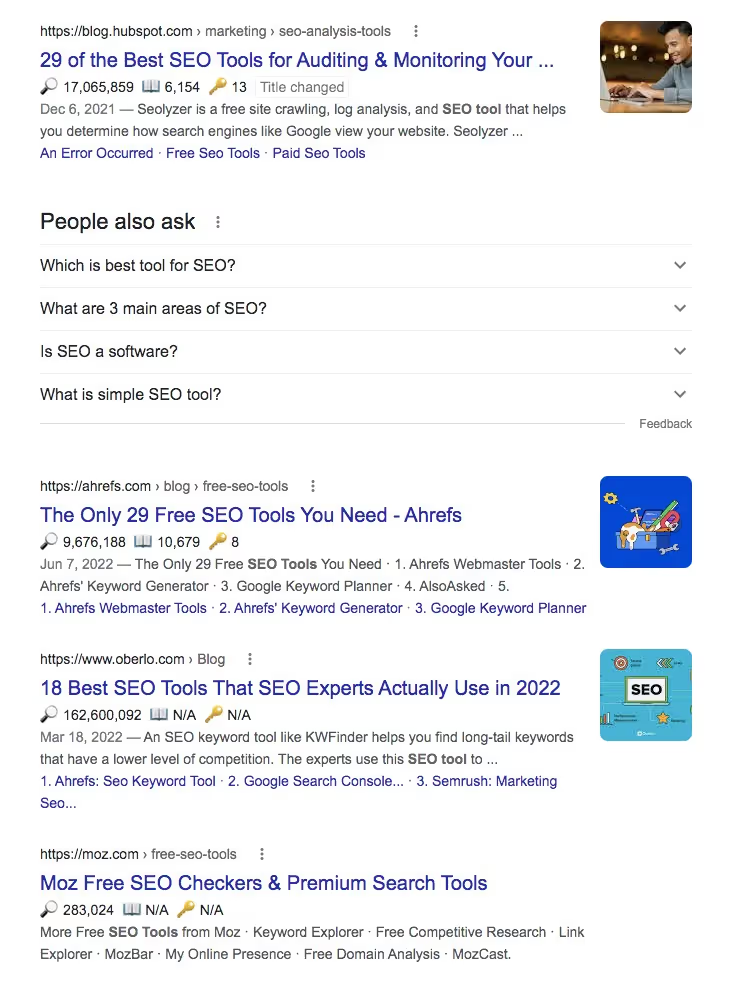
Once you scroll past the ads, you’ll find that the search intent for this query is pretty simple. Judging from the Google search results, we can tell that people are looking for a list of recommended SEO tools. And so there’d be no point reviewing a single SEO tool or writing a case study on how one SEO tool helped your blog.
When you’re optimizing an article, you may have to do this a couple of times for the target keyword and related variations.
Instead of doing this manually for every relevant keyword, identify search intent quickly and at scale by doing this:
- Head to Surfer Keyword Research Tool
- Enter your target keyword and country
- Hit Create
For example, when you enter “best SEO tool,” you’ll get the most appropriate phrasing of the keyword along with its search intent based on the top-ranking search results. Surfer Keyword Research Tool identifies the search intent of “best SEO tool” as customer investigation.
Hovering over the label shows “Cluster dominated by comparison of different products and/or services, listings, catalogs, directories relevant to the cluster”. This is exactly what we identified in our manual search.
Keyword Research Tool also suggests many related topics to strengthen website authority that you can filter based on search intent, relevant keywords, and search volume. In our example, we were shown 108 different topic ideas with search volumes and keyword difficulty data.
When you’re optimizing content, you want to prioritize your focus to first act on the pages that bring you the most traffic or conversions. If you’re in the content planning and production stage, use the Monthly Search Volume (MSV) metric to help you plan your SEO content optimization efforts.
You can also download Surfer’s Chrome extension for free or use the Surfer Keyword Research tool by following these steps.
- Enter your keywords into Keyword Research and select the country of choice
- Run the research
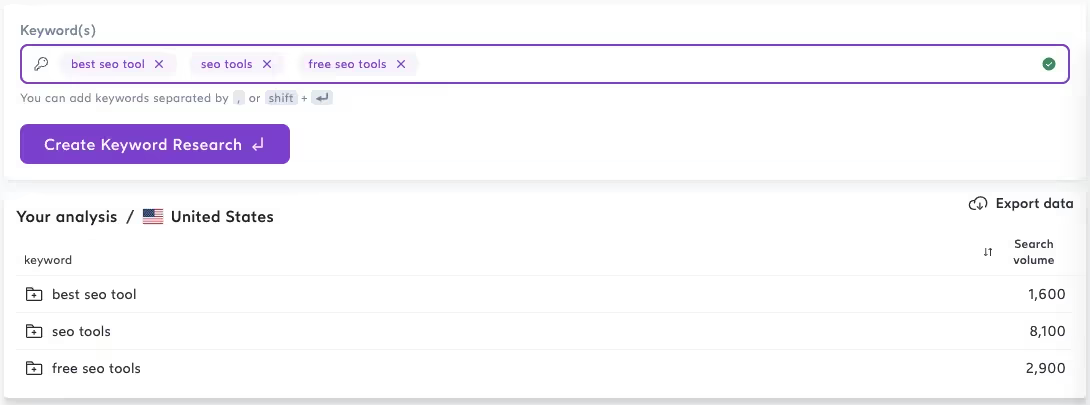
For example, if we plug in “best seo tools” and a few similar keywords into the Keyword Research tool, we’re shown their monthly search volume followed by related keywords.
If you’re optimizing an existing piece, identify your most visited pages using a tool like Google Analytics so you can target them first.
Once you’ve satisfied search intent, it’s now time to make sure you cover all the relevant keyword clusters.
3. Include semantically related keywords
To help search engines understand your pages, use semantically related keywords that are closely linked to the main keyword you are targeting.
To identify keywords that are conceptually related, here’s what you should do.
- Go to Surfer’s Content Editor
- Click New Content and enter up to 20 keywords
- Pick your location and language
- Choose a template, add your context and instructions, and select Write it yourself
(If you’re optimizing a published article, use Import from URL and enter the URL of your web page for Content Editor to pull from.)
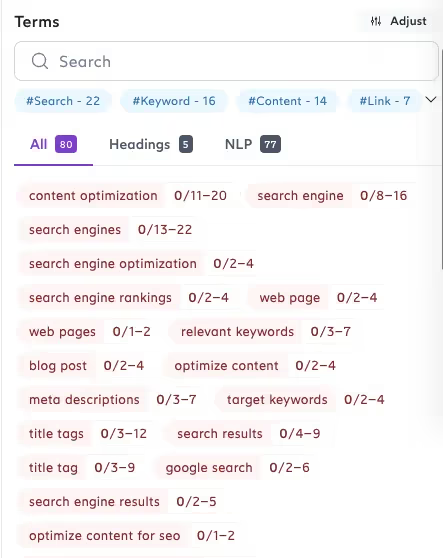
For example, when I was writing this article in Content Editor, I received suggestions for 80 related keywords that I should include in my content, for search engines to understand and categorize my page correctly.
To ensure that I insert these keywords the correct number of times without keyword stuffing the article, I’m also given a range of frequency. This metric shows me the appropriate keyword density of each semantic keyword taking into account the length of my article and the top search engine results pages.
Be sure to include these keywords and variations in your page headers as well.
Recommended Read: Guide to Keyword Research
4. Aim for Topical depth
In addition to matching search intent, your articles need to answer the search query in a comprehensive manner. Google disapproves of pages where readers return back to the SERP to continue their search because their question wasn’t answered. This means your article must provide information about different questions the reader may have within the limits of your topic.
To identify subtopics that your readers will be looking for and ensure that you always answer user queries with sufficient topical depth, perform these steps.
- Open Surfer Content Editor
- Click New Content and enter up to 20 keywords
- Pick your location and language
- Choose a template, add your context and instructions, and select Write it yourself
In the research and outline step of the Guidelines panel, Surfer lists the questions readers ask and the headings top-ranking pages use, so you know what to write about inside your article. For example, for this blog post I wrote about, I was suggested several related questions that a reader might ask in an article about content optimization.
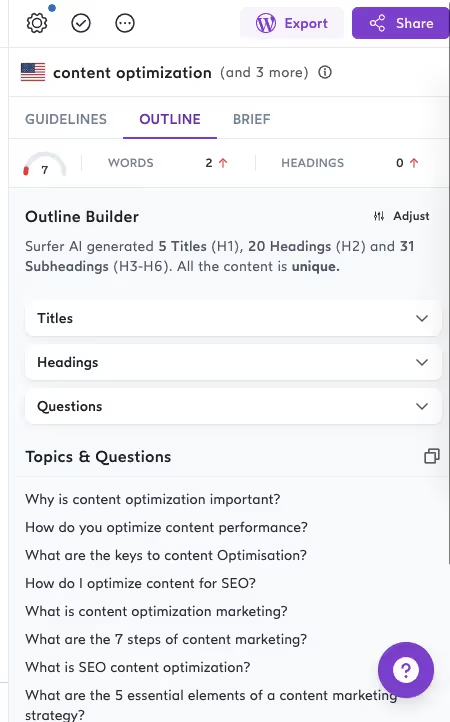
Based on these recommendations, I covered most of these in the article you’re reading for it to be a helpful guide to someone learning to optimize website content for SEO.
Besides saving you a bunch of time from analyzing competitor articles, Google autosuggest and the related keywords at the bottom of the SERPs, you can also use this outline step to help structure your information hierarchy.
Start with the most important information at the top followed by a logical flow of topics and instruction. This brings us nicely to our next tip on how to structure your content.
Topical depth now matters for AI answers too. In the write and optimize step, the AI Search box lists the facts AI answers expect to see, next to the SEO box with the entities to use. Both feed one AI SEO Content Score, and Auto-Optimize can add the missing entities and facts in one click. Before you publish, run AI Readability in the Pre-Publish Review step and click Analyze Content to get structure fixes that make your text easier for AI answers to quote.
Recommended Read: Proven Framework to Rank Pillar Pages
5. Make your content easy on the eye
Most people on the internet are skimming through your content, so it only makes sense for you to make your pages easy to digest. You want to break visual monotony and introduce distinct elements to convey information in an effective manner.
To make your content more scannable and visually appealing, use these formatting techniques.
Headings and subtopics - Break up your text into sections using H2 and H3 headers. This separates your page into different zones that break down information in a logical manner. Use the outline step in Content Editor that we discussed earlier to help come up with headers for your content.
Use images, infographics, and videos - Because we’re wired to process Images more efficiently than text, including them is a good idea. A wall of text can sometimes be intimidating, and a well-thought-out visual representation of the concept or step you’re writing about can enhance the readability of your web page. You can also take this a step further and create infographics or edit video assets that are inserted on your page.
Shorter paragraphs and text formatting - Use bullet points and lists to communicate your text, so they’re easier to skim through and recall. Italicize, bold, and underline keywords and important phrases to catch the reader’s attention. Shorter paragraphs are also helpful when reading on a screen.
Highlight the Call to Action - To ensure your readers take the next step, include a call to action at the end of your blog post. This could be by subscribing to your newsletter, following you on social media, or checking out one of your products or services. Your CTA should stand out and have a clear message, so readers are not wasting time looking for it.
6. Perform on-page search engine optimization
We’ve already covered keyword insertion and a logical heading structure but keyword placement is just as important. For Google to understand your article, the search engine looks for relevant keywords in specific areas of your page.
Here are some of the most important places to insert relevant keywords in your content.
- Title tags
- Headings and subheadings (H1, H2, H3)
- Page URL
- Body Content
- Introduction
- Meta descriptions
- Anchor text
To find ideas for title tags, headings and subtopics, head to Surfer Content Editor and perform the steps below.
- Click New Content and enter up to 20 keywords
- Pick your location and language
- Choose a template, add your context and instructions, and select Write it yourself
In the research and outline step, you’ll find the headings and questions from the top-ranking pages that are related to your keywords. For example, when I plugged in the keywords to write this article, Content Editor showed me the headings and questions that other pages on the same topic mentioned.
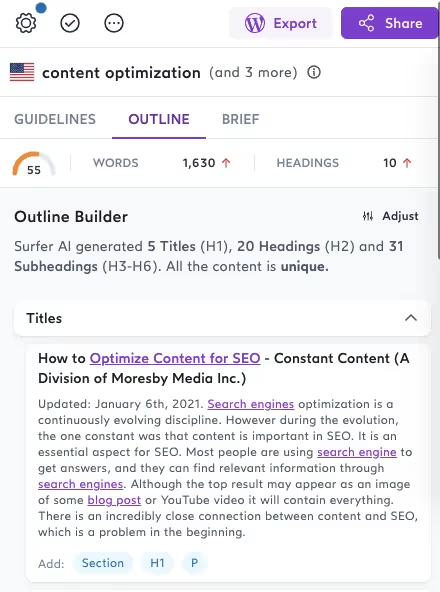
I used these as inspiration to develop my own title, meta description, and keyword phrases knowing that I was drawing from pages that were already ranking well for the same target keywords. Accessing these within the Editor can also help your content workflow because you do not have to spend time running manual searches and analyzing the competition.
Recommended Read: Ultimate Guide to Content Outlines
7. Help your readers (and Google) with internal links
Links act as the internet’s way of connecting different pages to one another. Think of them as highways that connect different parts of the web. Optimizing the links in your content is a great way to reference useful information to your readers and increase the number of pages viewed per session.
Links also help search engines understand your website structure and the relationship between different pages. When you’re optimizing website content, going through your existing blog posts and articles to find relevant internal links is a good idea.
Once you’ve identified a few relevant pages, link to them using the correct anchor text.
Make sure the anchor text is descriptive and relevant to the page you’re linking to. This will help provide signals to search engines to understand what your linked page is about.
Recommended Read: Advanced 3-Step framework to optimize your blog
8. Optimize content for backlinks and social shares
It’s no surprise that backlinks are one of Google’s strongest SEO ranking factors and can bring incredible organic search results. Your content strategy should include creating content that is specifically written to acquire backlinks, also called link bait.
To identify content that appeals to linking authority sites, also called linkerati, use a tool like Ahrefs Content Explorer with a minimum RD filter of 50 or search for your target keyword on Google and enable the Moz Chrome toolbar.
When creating link bait, you should consider what would make your content shareable and link-worthy. To do this, take a look at the competition and see what type of content is already ranking well and try to improve on it.
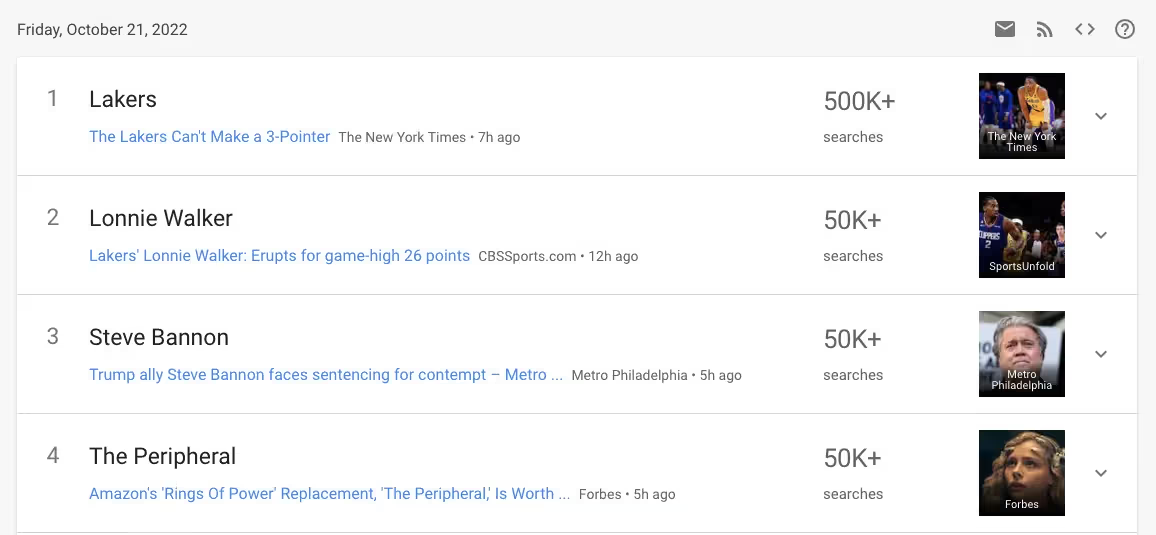
If you can turn around content quickly, another idea is to monitor Google Trends and capitalize on trending content if it is relevant to your audience. Then shoot out an email to your subscribers and promote it on your social channels while it is still being spoken about.
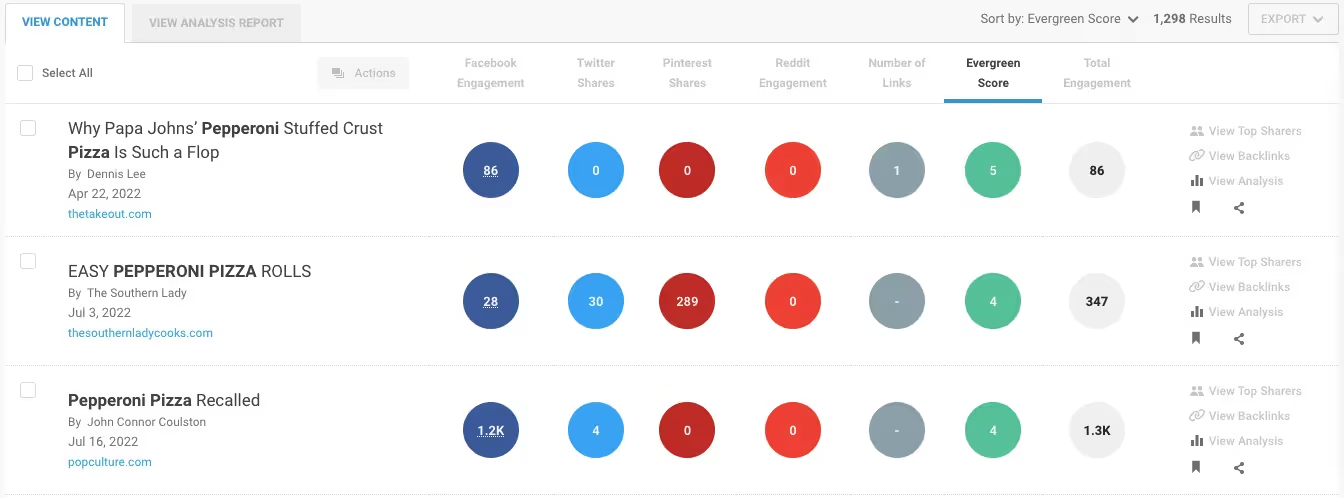
You can also use a tool like Buzz Sumo to find the most shared pages around your main topic and then create something similar with a unique angle to promote on social media. My search for “pepperoni pizza” for example, yielded 1298 results that I can then sort and filter through.
Recommended Read: Ultimate Guide to Link Building Strategies
9. Update your content often
Information is constantly being updated and changed, so your content should too. Outdated content can turn away customers because your company is seen as being out of touch or behind the times. Old content can also hurt your search engine rankings because Google may see your inactivity as less relevant. This is why your content marketing’s success partly depends on reviewing and updating your content periodically.
Google loves fresh content and will often reward sites that regularly publish new content with higher search engine rankings.
To ensure your site’s content is always fresh, set a schedule for yourself or your team to review and update old blog posts and articles. You can also use Google Alerts to receive notifications when someone mentions a certain phrase or keyword online.
Aside from ensuring your content is updated, you should also focus on making it the best it can be.
10. Improve the quality of your writing
You don’t have to win the New York Times Bestseller, but there’s no secret that improving the quality of your writing will enhance the reading experience and your credibility as a trusted source.
Since Google emphasizes the quality of content more than quantity, you should focus on making your content valuable, relevant, and engaging to improve your rankings. The most effective way to improve your writing is to well, write more.
As true as that is, I realize it may not be utterly helpful, so here are a couple more ways.
Write in a conversational tone - Nobody likes being preached to, especially on the internet. It always helps to use a friendly tone that you’d use with a friend in a relaxed environment. Unless you’re explaining scientific literature, there is no need to test the vocabulary of your readers. Simple, short sentences can be very effective in communicating your message well.
Sound excited, be excited - Monotones have a place in music theory so let them stay there. Your writing is an extension of your personality so let it show when appropriate. You want your readers to almost glide through your content without boring or overwhelming them.
Examples and use cases - Often, people try to learn a new piece of information or skill while reading your content. Help them out with examples and case studies that they can extract context from. Including a data source or image can back up your text in the reader’s eyes.
Tell stories - Include your own stories where possible, or retell stories that will help your readers. Humans have been known to grasp concepts more easily and recall better when consuming information in story formats.
11. Plan your content ahead of time
It’s always easier to optimize content when you have an idea of what your content marketing calendar looks like. This way, you can group together similar content and optimize them faster because you’ll be working on related topics.
Not only will this make your SEO content optimization process easier, but you can start to see patterns and trends in your content. You can then use this information to improve your content strategy and target new audience segments with similar interests.
To generate a list of content ideas in your niche, follow these steps.
- Open Surfer Keyword Research Tool
- Enter your target keyword and country
- Click Create
You’ll then be presented with a list of related keyword clusters that are grouped together by their main topic. In my example, entering “best SEO tool” gave me enough topics to write about for the next 12 months, assuming I’m posting 9 articles per month.
These topics are based on semantic relationships that Google expects to see when your website is about a certain subject. You don’t have to spend hours researching new topics that you should write about because they’re all in here.
You’ll also be shown other important metrics like monthly search volume and keyword difficulty to help prioritize your efforts.
Learn more about Content Optimization:
- Content Score – What It Is and How To Use It for SEO and Content Marketing
- How to Optimize a Blog Post After It Goes Live: A Three-Step Process
- How to use Surfer: Tips from the people who built it
Is content optimization ever finished?
Content optimization is an essential part of your SEO strategy that will help you rank higher, increase organic traffic and improve your overall results from search engines.
Apply the strategies you’ve learned in this article to start optimizing your content today and let us know about your wins and challenges. Talk to us below or on Twitter. Remember, optimizing your website’s content is an ongoing process so you’re never really done. Enjoy the journey.
Frequently asked questions
What is content optimization in SEO?
Content optimization is the process of improving a page so it matches search intent, covers the topic in depth, uses related keywords in the right places and reads well, which helps it rank higher and convert better.
How do you optimize content for AI search?
Cover the facts AI answers expect, answer the query early in your introduction, and use a clear structure with descriptive headings and short paragraphs. Surfer's AI Search guidelines show the missing facts, and Auto-Optimize can add them in one click.
How often should you update your content?
Set a regular review schedule and update pages when information changes or rankings drop. Content Audit in Surfer flags ranking drops so you know which pages to refresh first.
What is the difference between content optimization and on-page SEO?
On-page SEO is one part of content optimization: placing keywords in title tags, headings, the URL, meta descriptions and anchor text. Content optimization also covers search intent, topical depth, readability, links and writing quality.
Which tools help with content optimization?
Surfer covers the main steps: Content Audit to find pages to improve, Keyword Research for intent and volume, and Content Editor for keywords, topical depth, facts and structure. Google Search Console and Google Analytics show which pages to prioritize.