If you read our goodbye post, you know surfer.ai now runs on Astro. What I didn't say there: Surfer was the first of ten. Between 21 October and 19 November we moved ten of our group's websites off Webflow, WordPress, a hand-built Laravel site and AWS Amplify, onto Astro and Cloudflare.
No agency. Three people: Laurent on DevOps, Arek on the migration skill and process, and me on SEO. Plus Claude, Surfer and Ahrefs doing most of the heavy lifting.
Short answer: Claude does real SEO work once it has live data (Search Console and SERP data through Surfer MCP, links through Ahrefs) and a website it can edit directly. In practice that means a Git repo, not a page builder.
I wanted to write down what that looks like day to day, because "Claude for SEO" online is mostly prompt lists. This is the opposite: 12 workflows we ran on real sites in the last month, with the prompts, the numbers and the parts Claude got wrong.
The WordPress and Webflow era is over
For content and marketing sites, yes, I think it is. WordPress and Webflow didn't get worse. What changed is who edits your website. For twenty years it was a person clicking through an admin panel. Now it's an agent, and agents are great with files and pretty clumsy with dashboards.
Agents edit files, not dashboards
Claude can read every page in a repo in seconds, find every title over 60 characters, fix 400 of them and show you the diff. In wp-admin or the Webflow Designer that's 400 page edits, or an API plus a plugin you now have to maintain.
Git also gives you the things a CMS never really did: every change gets a preview, a reviewer and a one-click revert. And our repo checks itself. It refuses to deploy if it finds a broken link, a redirect chain, a bad hreflang pair or a missing tracker. Nobody has to remember.
Faster: from 72 to 98
Across 232 pages on mobile, surfer.ai's median Lighthouse score went from 72 on Webflow to 98 on Astro. 227 pages got better, and the number of pages that show their main content within Google's 2.5-second threshold went from 0 to 196.
It isn't just us. In HTTP Archive data, 71% of Astro sites pass Core Web Vitals, against 48% of WordPress sites (astro.build).
Safer: nothing left to patch
Patchstack counted 11,334 new vulnerabilities in the WordPress ecosystem in 2025, 42% more than the year before. 91% were in plugins, and the most exploited bugs were hit at scale within about 5 hours of going public (Patchstack). A static Astro site has no admin login, no database and no plugins running on each visit. There's nothing to patch at 3 a.m.
Cheaper: $30K a year before you edit a page
Here's the part that annoys me most. Open Webflow's pricing page and look for what a marketing team actually needs: publishing workflows, an activity log, localization, governance. They live in the Team plan, at $2,500 a month on an annual contract. That's $30,000 a year, and Enterprise is quote-only on top.
Below that, everything has a meter on it. Bandwidth is the funny one, because Webflow itself runs on Cloudflare (Cloudflare). Go to Cloudflare directly and static traffic costs nothing (Cloudflare Workers pricing).
Then there's the rest:
- Seats: $39 a month per full seat, $15 per limited one.
- 301 redirects: listed as a feature of the $49 a month Growth workspace plan. On Cloudflare it's a text file.
- Localization: a $9 to $29 a month add-on, per site.
Add it up for one site with 1 TB of traffic and five editors and you get $604 a month, about $7,250 a year, before localization. The same site on Cloudflare costs us $5 a month. I've moved a few of my own sites to Cloudflare for exactly this reason, and I know big brands making the same Webflow-to-Astro move right now.
Open source, still
Astro is open source. Cloudflare bought the team behind it in January 2026 and committed to keeping it that way. Your content lives in Markdown files you own, not in someone's database.
Ten brands, four old stacks, one repo
All ten sites now live in one repository and deploy to Cloudflare, and every pull request gets its own preview link. Surfer went first on 21 October, rapidmail last on 19 November, with Signitic, Ubic, positivegroup.com, Iconosquare, mailingwork, User.com, noCRM and Humanlinker in between.
The real argument is simpler than speed or price, though. A page is now a document, not a design canvas, and Claude reads and writes documents very well. Our marketers ask @Claude in Slack for a change and get back a pull request with a preview. One request fixed 625 headings on 125 Signitic pages in five languages in about 40 minutes. In a page builder, that's someone's whole week.
The Claude SEO stack we actually use
Three things: live data, a place to act, and a few rules. That's it.
Claude reads from Surfer and Ahrefs and writes only through pull requests and Surfer's Content Editor. When changes ship, they show up in Search Console, so the next run starts from fresh data. (If you came here looking for Claude Cowork: since September it's simply part of the main Claude app, so everything below works there.)
Surfer MCP
Surfer MCP connects Claude to your Surfer account. It's been in beta since August and it's listed in both the Claude and ChatGPT directories. Claude gets your Search Console data (clicks, impressions, CTR and position by query, page, date, country or device), the full Content Editor, SEO and AI Search guidelines for any keyword, your AI Tracker data, and six built-in skills for briefs, outlines, writing and optimizing. So if you're looking for a "Claude SEO skill", these are skills with live data behind them, not a prompt file.
Pro tip, the one that changed how I work: add every site as a Surfer workspace with Search Console connected. After that, "pull 16 months of GSC data by page for rapidmail.de" is one sentence instead of an export, and you get regex filters and date × page splits the GSC interface doesn't give you.
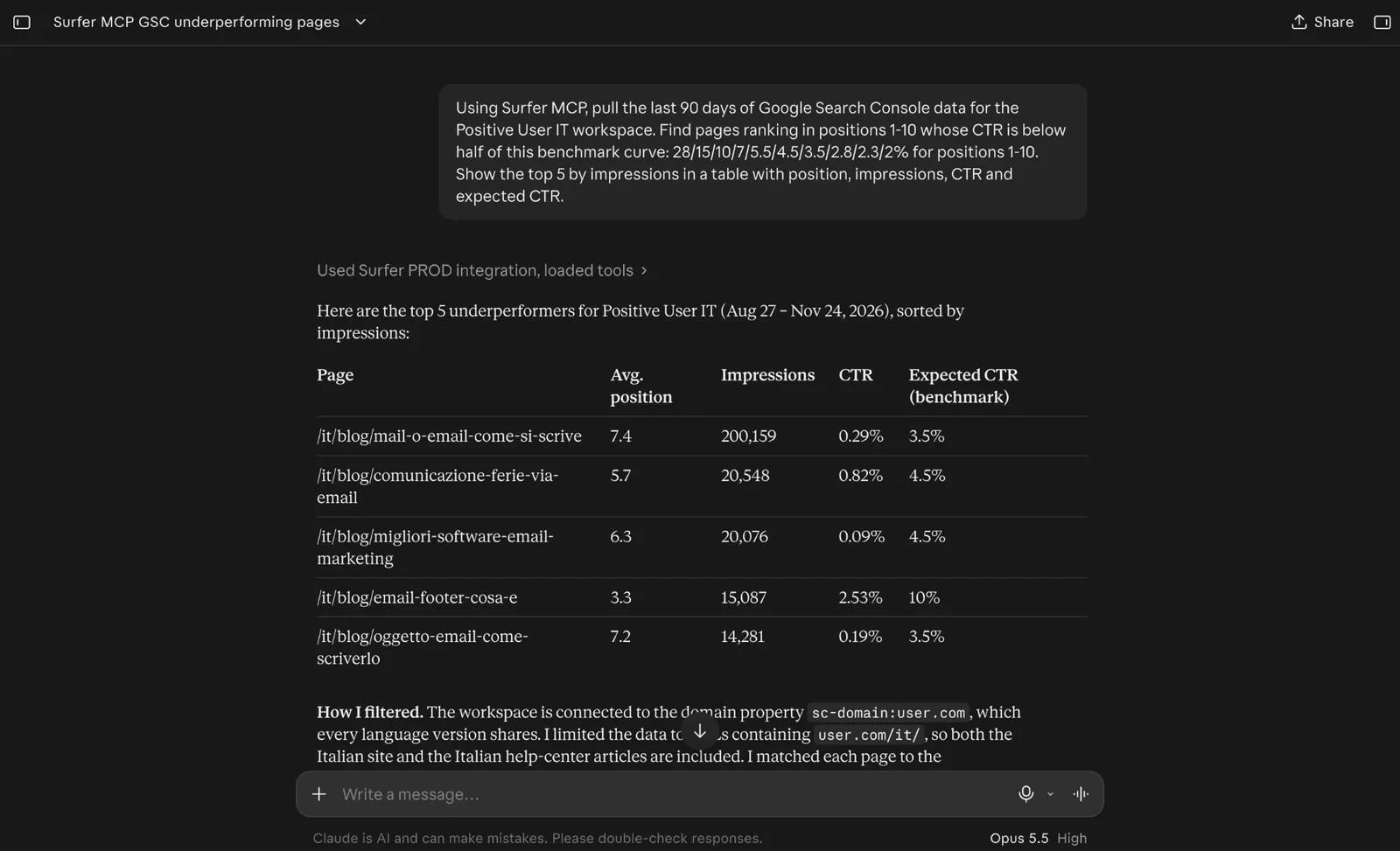
Here's what that looks like in practice. One prompt, two Surfer MCP calls, and Claude comes back with the Italian pages that rank well but don't get clicked:
Ahrefs MCP (optional)
Ahrefs gives Claude the outside view: top pages and pages with backlinks, broken backlinks, keyword volumes and SERP overviews. Just treat its traffic numbers as estimates. For rapidmail.de it estimated about 25,000 visits a month; Search Console showed about 8,500 clicks. I use Ahrefs for the market and GSC for the truth about our own sites.
Where Claude runs for us
I work in the desktop app, with Surfer and Ahrefs connected and the repo folder attached. Engineers use Claude in the terminal for migrations. Marketers tag @Claude in Slack and get a pull request with a preview: about 85 requests in 23 days across nine brand channels. Full repo access stays with a few people, and everyone else goes through reviewed pull requests.
Setup takes about 10 minutes
- Add Surfer from Claude's connector directory, or as a custom connector with
https://mcp.surferseo.com/mcp, then sign in. - Connect Ahrefs the same way, if you use it.
- Attach your site's repo folder in the desktop app.
- Write one instructions file: brand, markets, URL rules (trailing slash or not) and a few hard lines like "never push to main" and "never invent prices".
- Schedule a Monday check: "Every Monday at 8:00, pull last week's clicks by page from GSC through Surfer, compare with the week before and list the 10 biggest drops and gains with a likely cause."
9 workflows we run every week
Each one has what we did, a prompt you can steal, what happened, and the catch. They go roughly from "ten minutes" to "an afternoon".
1. Rescue CTR with Search Console
The easiest clicks are on pages that already rank. Claude pulls 90 days of GSC data by query and page through Surfer and flags anything in the top 10 whose CTR is under half of our benchmark curve. Then it rewrites the title and meta description, using only facts already on the page.
Pull 90 days of GSC data by query and page for [site] through Surfer. For positions 1–10, flag pages with CTR below half of this curve: 28/15/10/7/5.5/4.5/3.5/2.8/2.3/2%. Drop brand, competitor and bot-like queries. Propose new titles and meta descriptions from facts already in each article, and open one PR.
One Italian article on User.com had about 219,000 impressions in 90 days at position 7.9, and a CTR of 0.21%.
Its title went from "Mail o e-mail? Scopri come si scrive correttamente" to "Mail, email o e-mail? Ecco come si scrive correttamente". It was one of 12 rewrites in that pull request. We also shortened 107 French titles and ran a 43-page pass on the Surfer blog.
The catch: huge impressions with almost no clicks are usually bots and rank trackers. "best seo tool" had 5.14 million impressions and 3 clicks. Don't rewrite for them.
2. Audit six sites at once
This one still feels a bit like cheating. Claude starts one subagent per site, each with the same brief: striking-distance pages (positions 4–20), cannibalization, recent drops, content gaps against Ahrefs competitors and five Content Editor checks. Each one ends in its own pull request. My actual prompt, translated from Polish, was: "Do a proper Surfer × Ahrefs analysis and let's go."
noCRM got 17 title and H1 fixes, 38 internal links and 258 redirects. Signitic got 16 fixes, 19 links and 31 redirects. A shared rule that drops the brand name from long titles fixed hundreds more across all sites.
The catch: that Signitic pass found 52 URLs still getting Google traffic that had turned into 404s during its migration a week earlier. Run this after every migration, not just before.
3. Reclaim the links you lost
Ahrefs lists the broken backlinks, Claude checks each URL on the live site, and anything worth saving gets a 301 to its closest page. Our rule: at least 4 other sites link to it, or one DR 40+ site links to it from its content.
Pull broken backlinks for [old domain] and [new domain] from Ahrefs. For each dead URL with 4+ referring domains or a dofollow DR 40+ link, suggest the closest live page by topic with a one-line reason. Give me a redirects diff and a table to review.
Four days after the surfer.ai launch, the most-linked old URLs included 416 that returned 404, with links from 2,036 referring domains between them. We fixed the biggest first, then shipped 140 more 301s in one pull request.
The catch: not every old URL deserves a redirect. Pointing weak pages at the homepage just teaches Google to ignore those redirects.
4. Refresh an article with the Content Editor
The surfer-optimize-content skill pulls the URL into a Content Editor. Claude checks intent in Ahrefs, finds the missing facts, rewrites and rescores, and ships the result as a pull request.
Use the surfer-optimize-content skill on [URL]. Keep my structure and voice. Add missing facts only from sources you cite. Rescore after each pass.
Our AI SEO trends post went from 66 to 75 (SEO 72, AI Search 77), and its fact coverage from 59% to 71%.
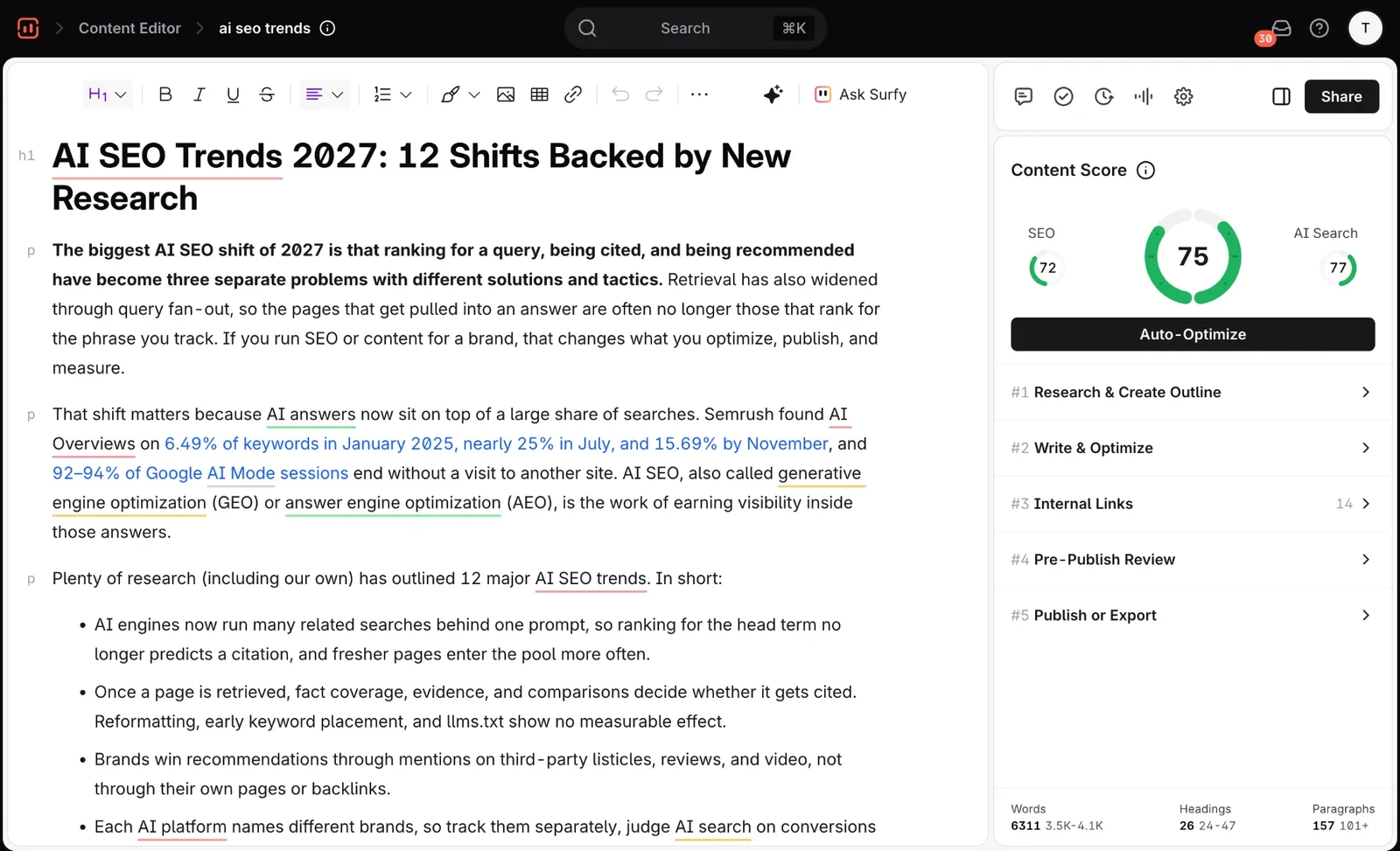
The catch: the score is a guide, not the goal. Every added fact gets checked against a primary source before it goes in.
5. Write pages without making things up
When you're not the expert, the risk isn't bad writing, it's confident nonsense. So the rule is simple: anything Claude can't verify gets marked, never guessed.
Write a draft for [keyword] with the surfer-write-article skill. Never invent prices, warranties or turnaround times. Mark anything you can't verify as [TO CONFIRM: …] and end with a list of questions for the owner.
For a small local service business, one page went from a score of 50 to 75, against 73 for the best competitor. Claude delivered five drafts and 36 questions for the owner.
The catch: for ambiguous keywords the SERP mixes intents. Check the competitor list by hand before you trust any score.
6. Comparison pages that survive legal
Facts about our product come only from our site. Facts about competitors come only from their pages, read the same day, with dated copies saved. Prices on the same billing period, "Not listed" when they don't say, and an honest note where they're stronger.
We built a compare hub for User.com plus pages against Brevo, HubSpot and ActiveCampaign. My favourite moment: Claude pushed back with "Two of your three leads don't hold against Brevo", which is also European, EU-hosted and multichannel. It was right. It also found contradictions on our own pricing page.
The catch: without your own screenshots and tests, a comparison page reads like an AI listicle.
7. Track AI visibility per market
We run 100 prompts per market, built from local Ahrefs volumes, local competitors and local wording. In French and German we track "Surfer SEO", because "surfer" on its own is a sport. Claude reads the results through Surfer MCP. Satya covers the method in how to track LLM prompts and how to earn brand mentions.
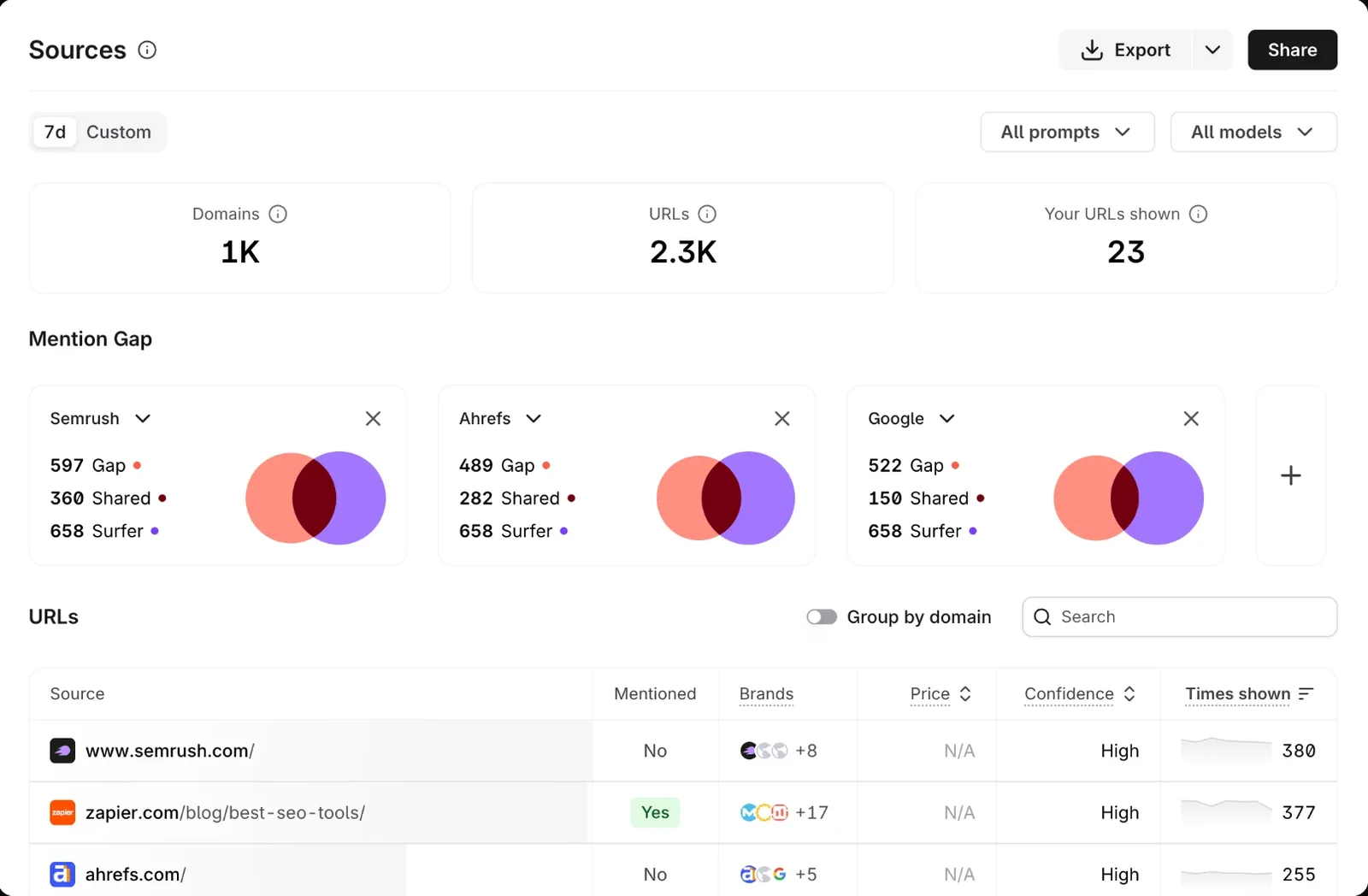
The catch: look at 30-day windows. ChatGPT visibility swings between 9% and 27% from one day to the next.
8. Let marketers ship from Slack
Tag @Claude in the site's channel with the request and the files, and you get a pull request with a preview link. A customer story from a .docx, with images converted and three translations, took about 25 minutes. Nine articles from a zip took 22.
The catch: Claude twice said "it's live" before checking. Now it has to paste the live link as proof.
9. Find the redirect that killed your rankings
After a brand merged into User.com, Ahrefs history showed its seven strongest pages all redirecting to a single sales page. One of them, a definition page, used to rank #2 for "newsletter" (22,000 searches a month). Claude rewrote 523 redirect rules and verified 548 of 550 test URLs. A few weeks later, the restored page is cited in Google's AI Overview for "newsletter".
The catch: a redirect that "works" can still wreck rankings. Check where each strong page lands, not just that it returns a 301.
Images and charts, the work nobody wants to do
This is where page builders hurt the most. Every image is an upload: find it, replace it, fix the alt text, publish, repeat. In a repo, images are just files, and Claude can make them itself.
10. Replace every outdated screenshot and claim
Our blog had the usual problem: screenshots of a product that had moved on, and sentences about features that had changed or were gone. So Claude checked every post against the current product, recaptured the old screens with its built-in browser and Surfer MCP, fixed or removed the outdated claims, and swapped everything in one pull request. A person signs in first; Claude never types passwords.
Check every blog post against the current product. List screenshots that show an old interface and claims about features that changed or were retired. Recapture each screenshot in the browser at the same size and crop, fix or remove each outdated claim, and open one PR.
Over 1,000 images replaced on surfer.ai in under 3 hours. It's the kind of job that never makes it to the top of anyone's list.
The catch: use a test account with demo data. A real customer's data in a published screenshot is a mistake you can't take back.
11. Redraw every chart from its data
Claude rebuilds each chart from its underlying numbers in our style, renders it and swaps in an image with the same file name and size, so no post needs editing. Every chart is now a small data spec in the repo that our build re-renders, so changing the style is one edit, not 75. Charts from other companies' studies stay as they are, unless they're hard to read; then we redraw them with credit.
Find every chart image in the blog. Rebuild each one from its underlying numbers in our chart style, keeping the file name and size. If a chart comes from a third party, keep the original and add a source credit. Open one PR.
The day we launched surfer.ai, we redrew 75 charts across the blog in about 40 minutes. That used to take a week.
The catch: a chart tool can report "done" when nothing rendered. Look at every chart in the preview before you merge.
The boss level: four domains, 1,063 redirects
rapidmail lived on four domains (rapidmail.de, .at, .fr and .com) on a hand-built Laravel site with Sanity. The plan was one domain, rapidmail.com, with a folder per language, on Astro, and to drop the weak pages while we were at it. It went live on 19 November. This was my first prompt, word for word, typos included:
we will migrate rapidmail.de and all domains into one domain: rapidmail.com. we have to plan the migration to map all 301 for the dev team. i want to use this moment to also get rid of weak pages and add localized versions in each language under rapidmail.com/de /fr etc. map everything, ask me questions in the meantime. use ahrefs, google search console (via Surfer mcp). read slack messages on #website-rapidmail and adjust if needed. goal is to have one strong website with proper redirect and win AI SEO game in all markets.
Step 1: list every URL that matters
Claude pulled URLs from Search Console through Surfer (868 pages, about 102,000 clicks in 12 months), Ahrefs top pages and backlinks for all four domains, the sitemaps, analytics landing pages and Google Ads final URLs. Break an ad's landing page and you pay for clicks that land on a 404. Then it crawled all 1,263 URLs and recorded the first hop and final status of each.
Step 2: one action per URL, decided by numbers
A page stayed if it had at least 50 clicks in 12 months, 3 referring domains or 10 Ahrefs visits. Anything from 10 clicks went to review.
The surprise was where the links were. Most of the link equity sat in legal and privacy pages, linked from the footers of customers' newsletters: about 3,400 referring domains. One privacy page was a 404 with 288 referring domains pointing at it.
Step 3: people decide the hard cases
Claude delivered the map as a Google Sheet with a 166-row review tab. For each row a reviewer picks Approve, Keep page or Use my target, and a formula works out the final URL. Claude proposes; the business decides what it keeps.
Step 4: check the live site, not the plan
On switch day I asked:
Do the massive verification of all redirects, if all the pages are loading properly, if all the files are being served properly as well. And lastly, do the tracking analysis as well… Take your time.
All 1,063 old URLs ended on a live page, 1,039 of them in a single hop. All 1,271 new pages returned 200 with a self-referencing canonical. gclid, msclkid, UTM and partner parameters survived every redirect, and a visual scan of every page at desktop and phone widths caught a handful of CSS issues, fixed in one pull request.
Here's what Claude got wrong. Before launch it reported 55 targets returning 404 and 496 redirects taking two hops. It had tested the spreadsheet, not the deployed redirects, and the numbers were simply wrong. Two self-redirects also slipped in after a late trailing-slash change, and someone on the rapidmail team caught them.
Step 5: fix forward
When someone asked for a rollback plan, my answer was "what rollback, it's a 301 migration". Undoing redirects confuses Google more than fixing them. So we watch Search Console and fix forward with pull requests.
We turned the whole process into a reusable Claude skill: 14 steps from inventory to cutover, with checks that block redirect chains built in.
What Claude got wrong
Plenty, honestly. None of it reached visitors, because of the guardrails below, but it's worth knowing what to expect. Asked how much faster the new sites were, it compared file sizes and mixed field data from different months. It read an Ahrefs estimate of monthly visits as weekly. It counted 33 URLs as 66. It said "it's live" before checking, twice. And it flagged broken sign-up links that worked fine once the page's JavaScript ran.
So these are the rules now:
- Every change is a pull request with a preview link. Nobody pushes straight to production, Claude included.
- The build blocks the obvious mistakes: broken links, redirect chains, hreflang errors, missing trackers.
- Proof, not claims. "Done" comes with a live link, a preview or test output.
- Every number has a unit and a source. "Estimated monthly visits (Ahrefs)" is not "clicks (GSC)".
- People own DNS, production merges, legal review and expert facts. Claude never types passwords.
One line I added to my instructions after a week of back-and-forth: "Be more firm with answers but double check if we are right." It works better than it has any right to.
One month later on surfer.ai
Changing your domain and your CMS on the same day is supposed to be the riskiest move in SEO. We did both on 21 October. Less than three weeks later, the new domain had passed the old one.
Those are Ahrefs estimates. Search Console, the number I actually trust, counted 51,068 clicks for surfer.ai in the 28 days to 21 November.
AI answers moved at different speeds. In our AI Tracker (100 prompts, 18–24 November), Google's AI Mode, AI Overviews and Gemini already cited only surfer.ai. ChatGPT is slower: 28% of its citations used the new domain. That's one more reason every old URL redirects to the same path in one hop. Old citations still land on the right page while ChatGPT catches up.
Your first week
You don't need ten sites or a migration to start. One small thing a day:
- Monday: connect Surfer MCP and add your sites as workspaces with Search Console. Ask: "Summarize the last 90 days of GSC for [site]: top pages, biggest drops, and queries in positions 4–15."
- Tuesday: run the CTR rescue on your top 50 pages.
- Wednesday: reclaim lost links, if you have Ahrefs connected.
- Thursday: refresh one article with the Content Editor and compare the scores.
- Friday: write your instructions file and schedule the Monday check.
- The weekend: price your website. If every change still means clicking through a page builder, list your pages, redirects and hosting bill, and ask Claude for a migration plan.
FAQ
How do I use Claude to do my SEO?
Connect it to live data (Surfer MCP for Search Console and SERP data, Ahrefs if you have it), give it a place to act (your site's repo or Surfer's Content Editor), and start with one workflow, like the CTR rescue. Review every change before it ships.
What happened to Claude Cowork?
In September 2026 Anthropic merged Cowork and chat into one Claude app. Folders, connectors, skills, plugins and scheduled tasks all work from any conversation now (Anthropic).
How do I add an MCP server to Claude?
In the Claude app, add Surfer from the connector directory, or add a custom connector with https://mcp.surferseo.com/mcp and sign in. In the terminal: claude mcp add --transport http --scope user surfer https://mcp.surferseo.com/mcp, then authenticate.
Is Claude better than ChatGPT for SEO?
Surfer MCP works with both. For us the deciding factor wasn't the chat. It was Claude working across a whole repository for hours: hundreds of file edits, crawls, subagents in parallel and a verification pass at the end.
Is Astro good for SEO?
For content and marketing sites, yes. Pages are pre-built HTML with little JavaScript, and titles, canonicals, hreflang, schema and redirects all live in code you control. The trade-off is that there's no visual editor.
Can Claude run SEO tasks on a schedule?
Yes. Scheduled tasks run hourly, daily, weekly or on weekdays, in the cloud, even with your laptop closed (help center). Tasks that need files on your computer need the desktop app open.
That's it
The data side is solved: Search Console, SERP guidelines and backlinks are one connector away, and Claude can act on all of it. What usually isn't ready is the website. If yours still lives in a page builder, that's the first thing I'd fix.
If you want to try it, connect Surfer MCP, add your site and run the CTR rescue on your top pages today. And if you build a workflow I haven't listed here, I'd genuinely like to hear about it.