Schema markup can improve your AI visibility, but not because it directly earns more AI citations. Even Google confirms there's no special schema required for AI features. Instead, schema helps search engines understand your content, powers rich results, and supports the traditional rankings that AI search engines often rely on when choosing sources.
Let’s look at what the evidence says, where schema delivers real value, and how to implement it. In short:
- Adding schema to pages that were already cited by AI produced little to no change in AI citations in a controlled 2026 study.
- Schema helps indirectly: it clarifies your entities, supports the rankings AI engines draw on, and makes content easier to extract.
- Google and Microsoft have both said their systems use structured data, and ChatGPT's web search relies on Bing's index.
- Implementation takes three steps: choose the primary schema, add supporting schema, then write it in JSON-LD and validate it.
- Track rich results and AI Overview appearances in Search Console, and AI citations across engines separately.
Does schema markup help you show up in AI answers?
Not directly. Adding schema markup doesn't automatically increase your chances of being cited by AI search engines.
Google has confirmed there's no special schema required for AI Overviews or AI Mode, and a controlled 2026 Ahrefs study found that adding structured information to pages already being cited didn't produce a meaningful increase in AI citations.
But that doesn't mean that schema isn't worth using for answer engine optimization.
It helps AI systems understand your content, clarifies entities like your brand and authors, and makes your pages eligible for rich results. Both Google and Microsoft have also confirmed that their systems use structured data.
The biggest benefit of implementing schema markups for AI visibility is a bit more indirect: schema supports the traditional search rankings that AI engines most often rely on when choosing which sources to cite for search results.
That may not be as exciting as "add schema, get more AI citations," but it's a much more accurate picture of how structured data actually works. The evidence below explains why.
What the causal data actually shows about schema and AI citations
If you only looked at correlation, you'd probably conclude that schema markup is an AI ranking factor. Controlled studies tell a different story:
1. Adding schema alone didn't increase AI citations
The strongest causal evidence we have today suggests that adding schema markup alone doesn't directly increase LLM citations.
A 2026 Ahrefs study (the same one I cited earlier) tracked 1,885 pages that added JSON-LD schema, compared them with 4,000 similar pages, and measured citation changes across Google AI Overviews, AI Mode, and ChatGPT.
The results showed little to no measurable impact.
- Google AI Mode citations increased by 2.4%
- ChatGPT citations increased by 2.2%
- AI Overview citations declined by 4.6%, although researchers couldn't confidently attribute that decline to schema markup itself
| AI source | Effect on citations | Verdict |
|---|---|---|
| Google AIO | −4.6% | Small but statistically significant decline relative to matched controls; (both groups were declining together, but treated pages fell slightly faster) |
| Google AI Mode | +2.4% | Statistically indistinguishable from zero |
| ChatGPT | +2.2% | Statistically indistinguishable from zero |
One important caveat: every page in the study was already receiving AI citations before the schema markup was added.
So the experiment answers one question: Does adding schema increase citations for pages that are already visible?
Based on the evidence, no.
What the study doesn't answer is whether schema markup helps a brand-new page get discovered, crawled, or better understood before it starts appearing in AI answers. The researchers explicitly call out that limitation, so the findings shouldn't be interpreted as proof that schema has no value.
2. Rich, detailed schema outperformed generic schema
A separate 2026 study by Marshal looked at which types of schema markup matter.
Researchers found that generic schema like Article, Organization, and BreadcrumbList showed no citation advantage. But Product and Review schema populated with real details—such as pricing, ratings, and specifications—were cited 61.7% of the time, compared to 41.6% for generic schema (a 20-point difference).
The study also found that Google rankings were still the strongest predictor of AI citations. Pages ranking #1 in Google were cited in 43% of the queries they appeared in, while pages ranking #7 were cited just 5% of the time.
In other words, the right schema can help AI systems understand your content better, but it works alongside strong organic rankings—not instead of them.
So why is schema markup correlated with answer engine optimization?
Before running its experiment, Ahrefs analyzed 6 million URLs and found that AI-cited pages were much more likely to use JSON-LD.
That doesn't mean schema markup directly caused those citations.
Sites that implement structured data also tend to publish better content, invest in technical SEO, and rank well in Google search results. Those factors make them more likely to be cited by AI engines.
Once Ahrefs isolated the effect of adding schema alone, the apparent advantage largely disappeared.
Where schema markup genuinely helps: rankings, entities, and clean extraction
The research doesn't suggest schema is a shortcut to AI citations. Instead, it works as infrastructure that helps AI engines understand, organize, and extract information from your content.
When it's implemented well, schema supports AI visibility in three important ways:
1. It helps search AI-powered search engines understand your entities
Schema markup tells AI engines exactly what they're looking at.
Instead of guessing whether a name refers to a person, company, product, or location, structured data makes those relationships explicit. For example, you can define that a person works for an organization, that a product belongs to a brand, or that an article was written by a specific author.
Using @id and @graph also lets you connect these entities into a small knowledge graph instead of creating isolated pieces of markup.
That gives search engines and AI systems a much clearer understanding of how everything on your site fits together.
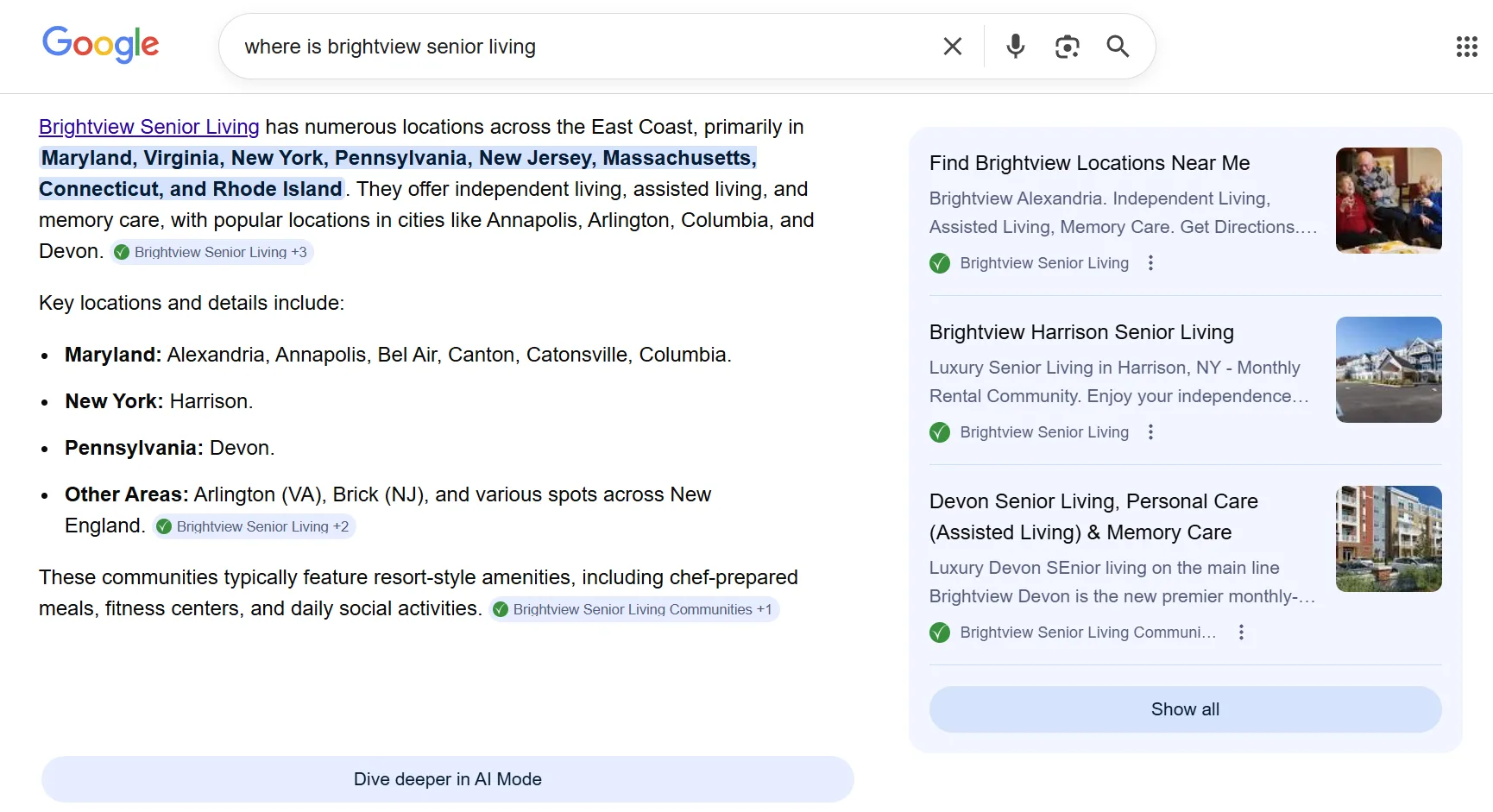
Brightview Senior Living used this approach to disambiguate entities around its "assisted living" content. After implementing entity linking, the company reported a 25% increase in clicks and a 30% increase in impressions for high-intent, non-branded queries related to that entity.
2. Schema markup improves rankings on Google that lead to AI citations
Earlier, we saw that Google rankings remain the strongest predictor of AI citations.
Schema contributes by making pages eligible for rich results, which can improve visibility and click-through rates for traditional SEO. And proper schema markup links content to Google's Knowledge Graph—which often appear for AI Overviews.
Better rankings don't guarantee AI citations, but they do improve your chances of being selected.
Surfer's research also shows that 54.14% of the top three AI Overview citations also ranked in Google's top 10 for either the main query or at least one related fan-out query.
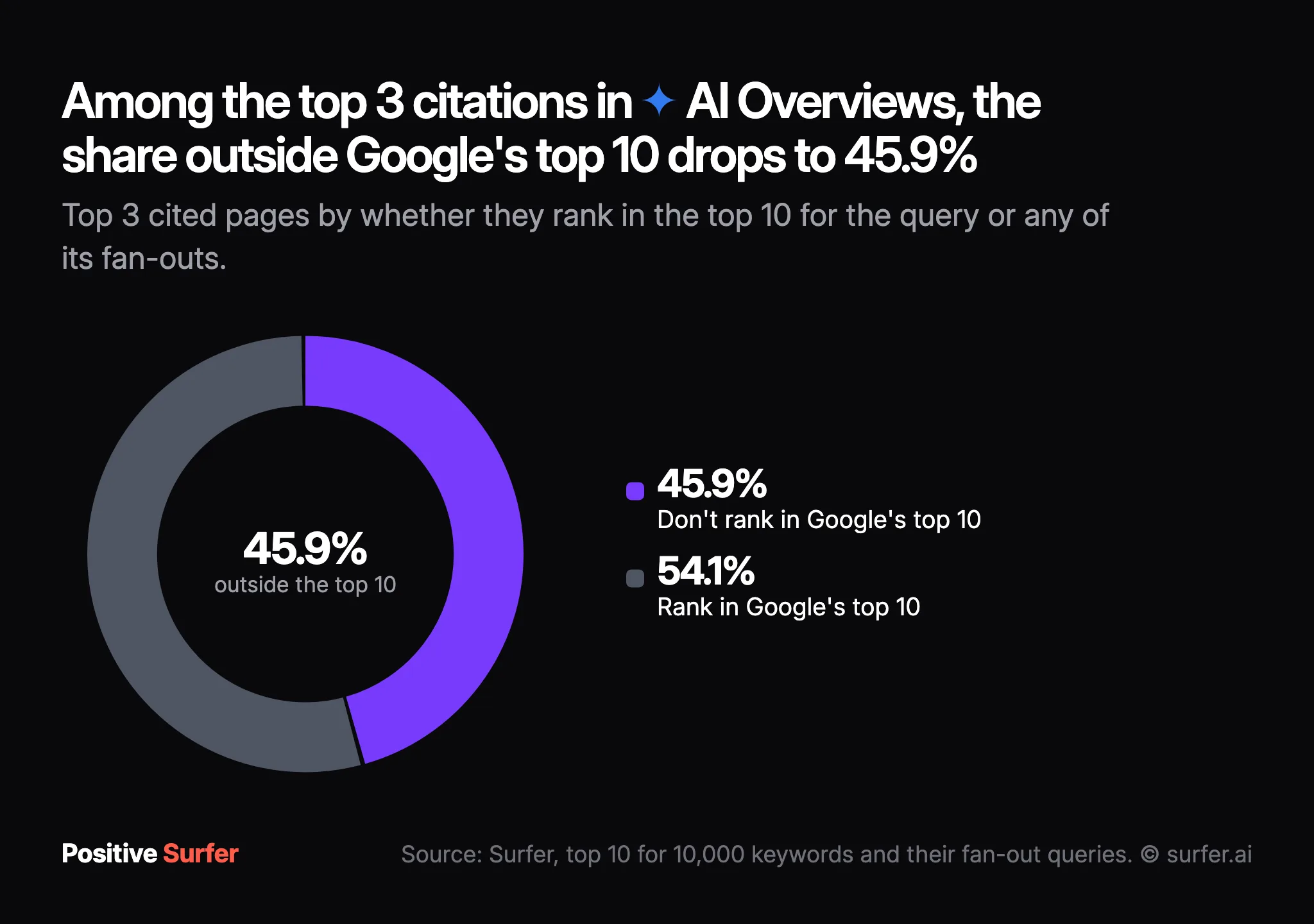
In other words, strong organic visibility and AI citations often go hand in hand.
3. It makes your content easier for AI engines to extract
If your content doesn't clearly cover the right entities, facts, and relationships, adding structured data won't magically make it AI-friendly.
That's why the content structure behind your schema matters just as much as the markup itself.
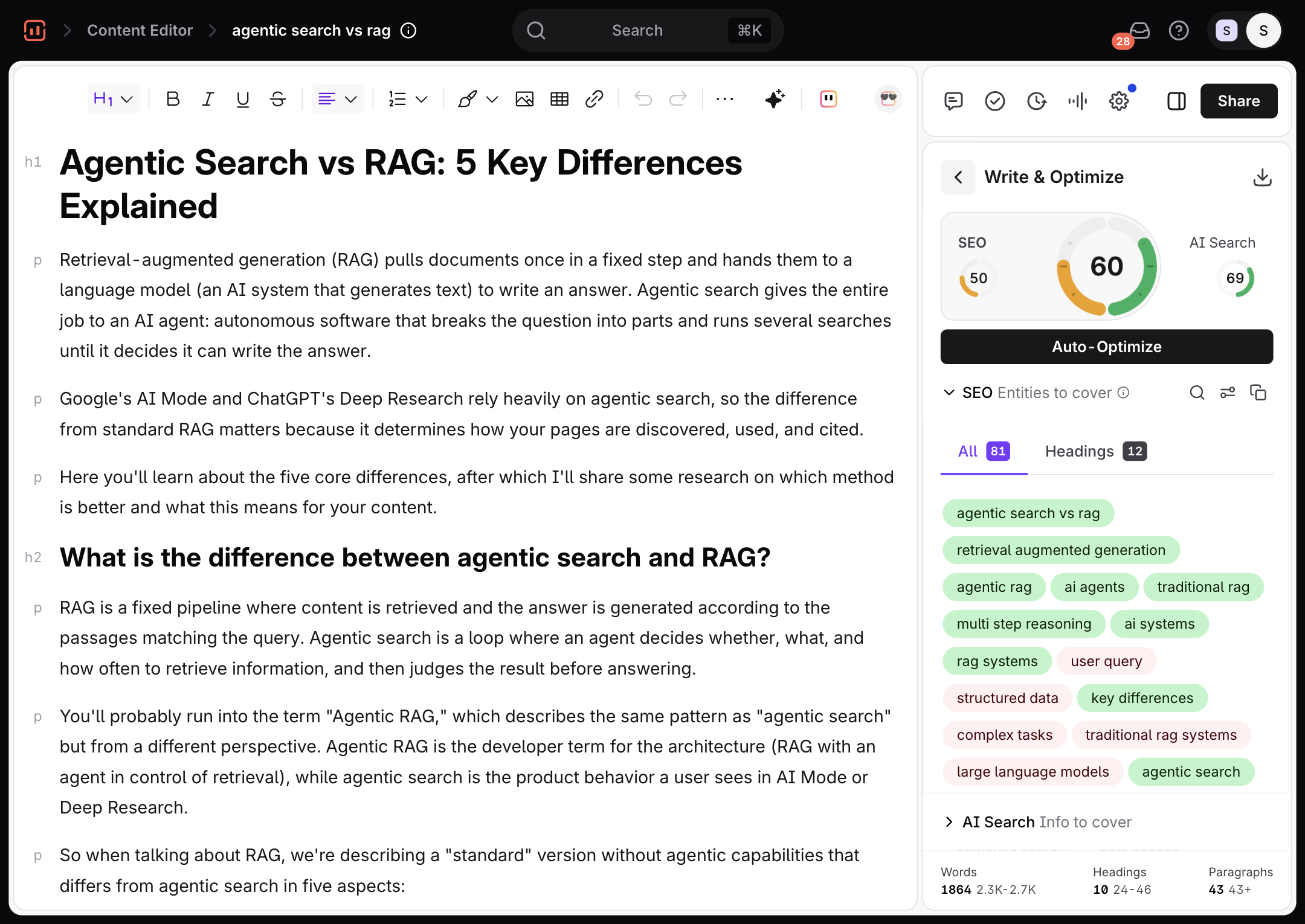
Surfer's Content Editor is a great way to close this gap as it actually helps you build the content that schema describes, instead of just generating schema.
In the Write & Optimize panel, the AI Search score and coverage guidance highlight missing entities, facts, and topics that AI search engines expect to see, making it easier to create pages with direct answers that are easier to extract for large language models.
Why Bing and ChatGPT make schema worth doing anyway
The research shows that implementing schema markup isn't a direct ranking factor for AI citations.
Even so, it's one of the few AI visibility practices that Google and Microsoft have publicly confirmed their AI engines use. That's a stronger foundation than much of today's AI SEO advice, which is still based on experiments and educated guesses.
At SMX Munich in March 2025, Microsoft's Bing Principal Product Manager Fabrice Canel confirmed that Microsoft uses structured data to help its large language models understand web content for Copilot.
And just a day later, at Google Search Central Live NYC, Google's structured data engineer Ryan Levering said
"a lot of our systems run much better with structured data," adding that it's "computationally cheaper than extracting it."
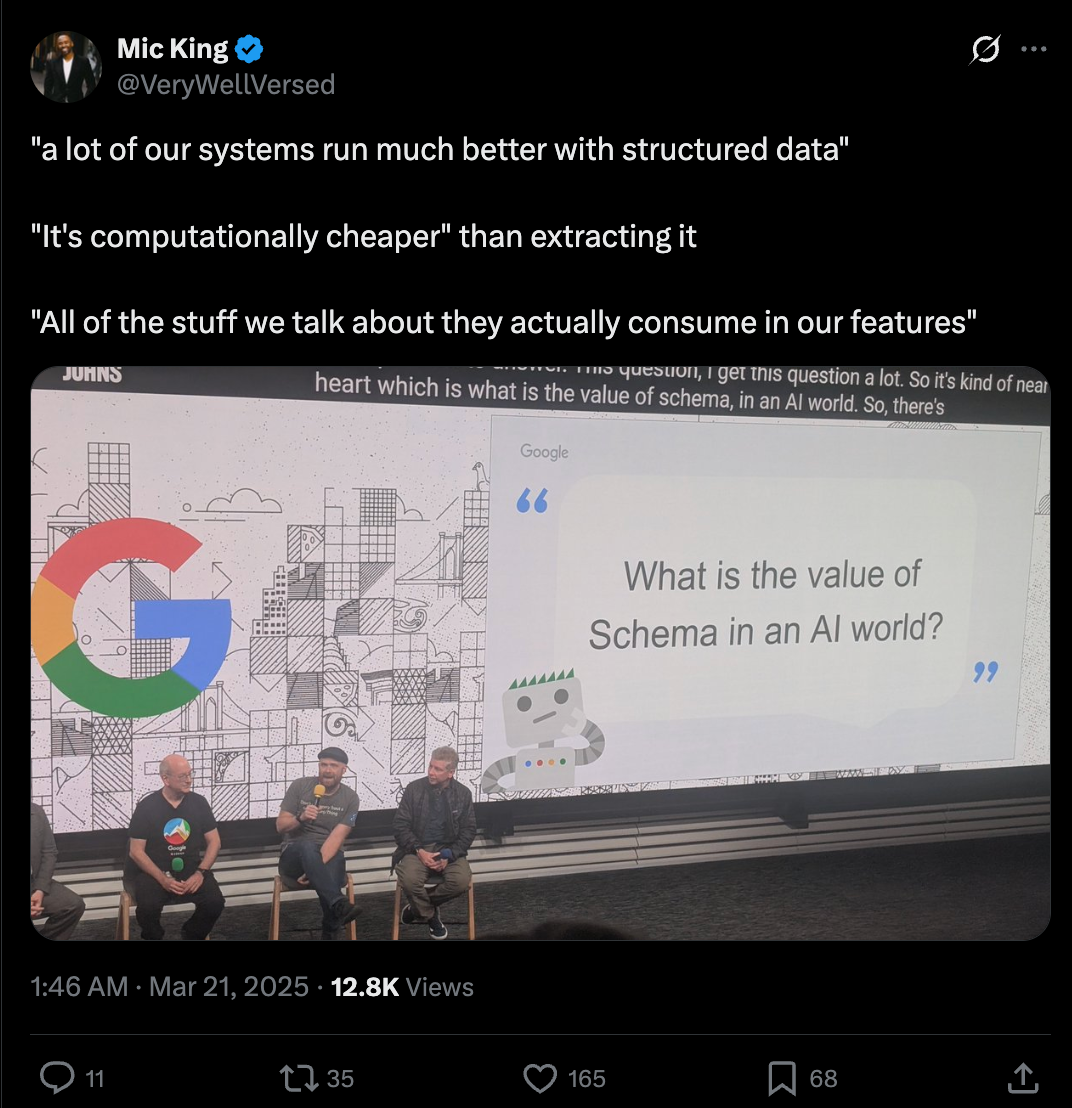
Those comments don't mean schema markup automatically earns AI citations. But they do confirm that both companies use structured data to help their AI systems interpret content.
That matters for ChatGPT, too.
OpenAI hasn't made an equivalent public statement about schema markup, but ChatGPT's web search relies on Bing's search index. So improvements that help Bing understand your content have a direct path into the pages ChatGPT can retrieve and cite.
We've already seen early evidence of this in the real world.
After implementing connected schema markup with entity linking across its own website in October 2025, Schema App measured a 19.72% increase in AI Overview visibility for the entities and topics it optimized.
While this is a single case study (not proof of causation) it aligns with the broader idea that making entities easier for machines to understand can improve AI visibility.
Of course, schema can only amplify pages that already have a chance to be discovered.
And Google has clarified it doesn't require any special structured data to appear in AI features—your page simply needs to be crawlable, indexed, and eligible to show search snippets.
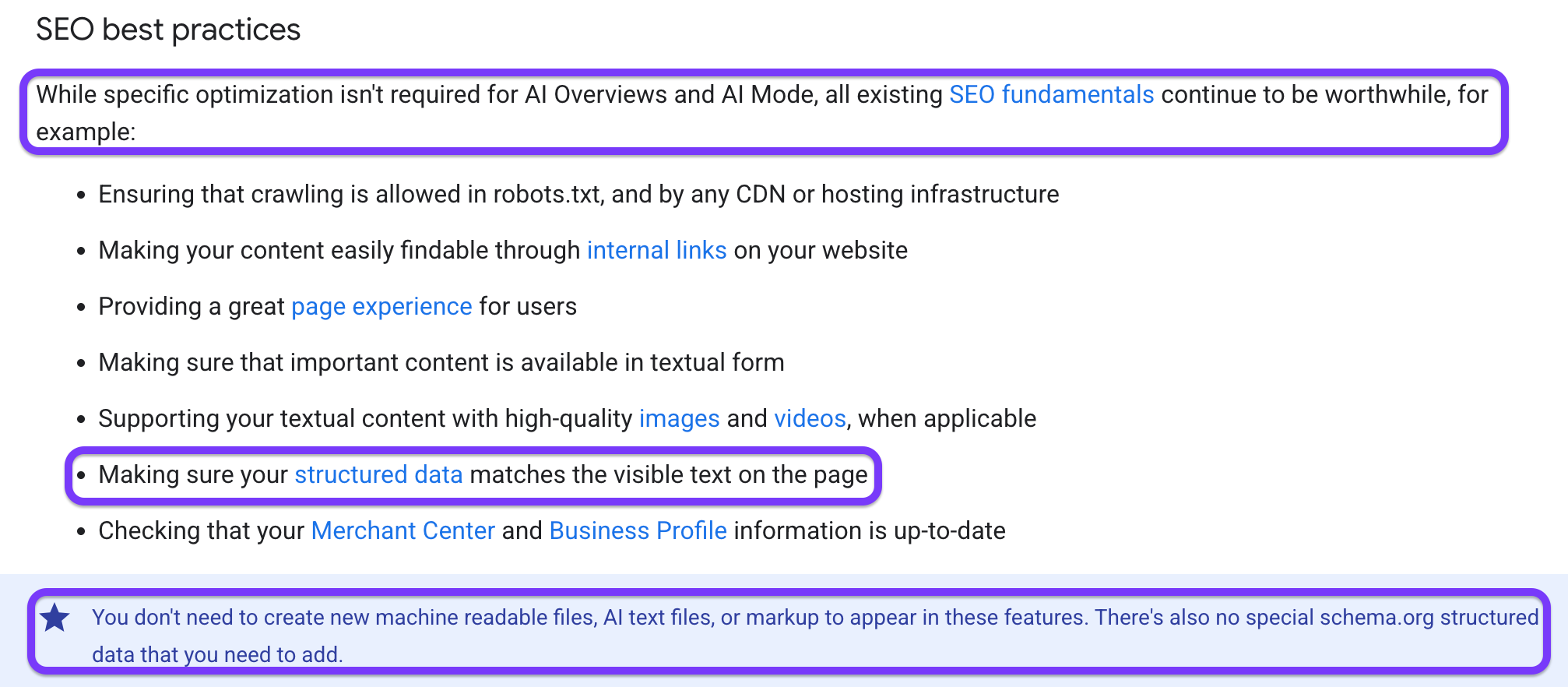
Since rankings remain the strongest predictor of AI citations, SEO teams should focus on getting those fundamentals right first. Then use schema markup to make your content easier for search engines and AI systems to understand.
How to add schema markup that supports answer engine optimization
Schema implementation for AI visibility comes down to three steps:
- Choose the primary schema type that matches your page—such as Product for ecommerce pages, Article or BlogPosting for blogs, or NewsArticle for news content—and populate it with complete, accurate attributes.
- Next, layer in supporting schema like FAQPage, HowTo, Person, Organization, and publisher details where they genuinely apply.
- Finally, implement everything as JSON-LD, validate it, and make sure every property matches the visible content on your page.
Remember, rich, accurate structured data helps search engines and AI systems understand your content. Empty or misleading markup doesn't.
And make sure you start with the schema that carries the most meaning, then layer on supporting markup, and finish by validating your implementation.
Here’s exactly how you can scale schema markup for AI driven search:
1. Identify the primary schema for your page type
Choosing the right schema type is the most important decision you'll make when implementing structured data.
Start with the schema that best matches what the page actually is, then populate it with the relevant properties.
A generic declaration provides very little context, while a complete schema gives AI systems much more information to understand your content.
You can find every supported schema type on Schema.org, while Google's structured data documentation explains the required and recommended properties for each one. Use them as your reference to make sure you're implementing the fields AI systems actually expect.
Just as importantly, don't stop at the minimum required fields. Fill every relevant property with accurate information instead of publishing a bare schema block.
One ecommerce site rolled out complete Product schema—including price, availability, and AggregateRating—across more than 8,400 product pages. As a result, rich result eligibility increased to 78–82%, click-through rates improved by 48–62% for those pages, contributing to a 52% increase in overall CTR and 41% more organic clicks.
And this is why a Product schema should do more than tell search engines that the page is about a product. It should describe the product with meaningful attributes like pricing, availability, and ratings.
Here's the difference between a bare type declaration and an attribute-rich block:
{
"@context": "https://schema.org",
"@type": "Product",
"name": "Wireless Noise-Cancelling Headphones"
}
This markup is technically valid, but it provides very little context. Search engines know the page is about a product, but they don't know its price, whether it's in stock, or how customers have rated it.
Now compare it to a more complete structured data code:
{
"@context": "https://schema.org",
"@type": "Product",
"name": "Wireless Noise-Cancelling Headphones",
"brand": {
"@type": "Brand",
"name": "Acme Audio"
},
"offers": {
"@type": "Offer",
"price": "199.99",
"priceCurrency": "USD",
"availability": "https://schema.org/InStock"
},
"aggregateRating": {
"@type": "AggregateRating",
"ratingValue": "4.8",
"reviewCount": "362"
}
A more comprehensive schema gives search engines a much clearer picture of the product by including:
- name — identifies the product.
- brand — associates the product with its manufacturer or brand.
- offers — specifies the current price, currency, and stock availability.
- aggregateRating — provides the average customer rating and total number of reviews.
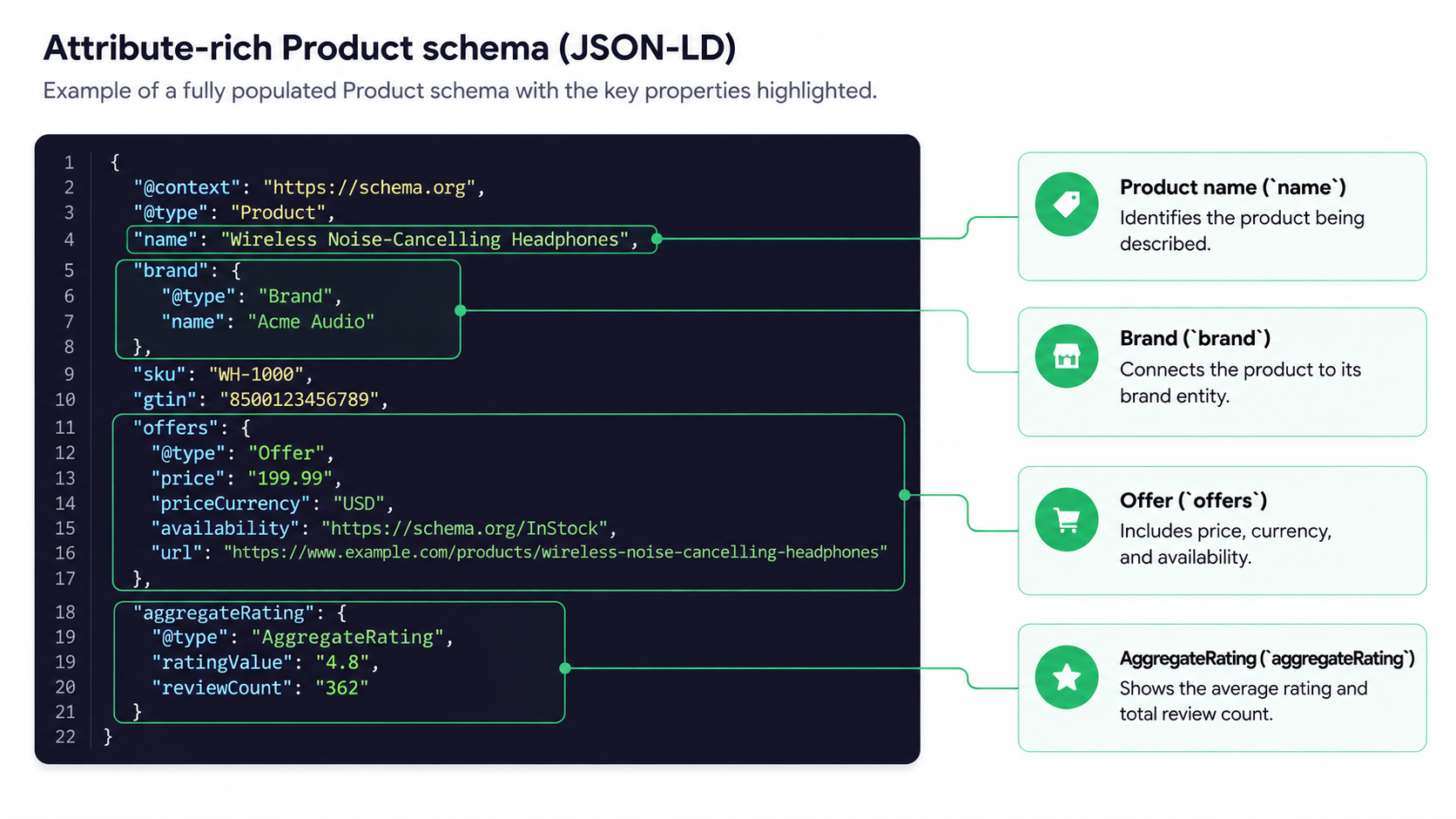
The takeaway isn't to add every available property for the sake of it.
Instead, include every property that's relevant and accurately reflects the content on the page. A complete, truthful schema provides far more context than a bare type declaration while remaining consistent with the visible content.
2. Add supporting schema
Once you've added the primary schema for your page, layer in the supporting schema that provides additional context. Research shows that pages using three or more schema types have a 13% higher citation likelihood.
Adding multiple schema types don't replace your primary markup—they complement it by helping search engines understand your content, authorship, and the entity behind your website:
FAQPage
If your page includes a genuine FAQ section, add FAQPage schema so each question and answer is explicitly marked up. This mirrors the way AI systems often retrieve and present information, making it easier to identify individual answers.
That said, don't add FAQ schema just because it's a perceived SEO best practice.
Google dropped FAQ rich results from most search listings in May 2026, so it no longer provides the SERP visibility it once did. Use it only when your page already contains helpful question-and-answer content that benefits readers.
HowTo
For tutorials and step-by-step guides, add HowTo schema to define each step in the process. This gives search engines a clear structure to follow and makes it easier for AI systems to extract individual instructions.
You don't need an entire page dedicated to a how-to. If a section of a larger article walks readers through a process, that portion can still benefit from HowTo schema.
Author, dates, and publisher
For articles, make sure your Article or BlogPosting schema includes accurate author, publication, and publisher information.
Instead of listing the author as plain text, link them to a Person entity whenever possible.
Remember to keep datePublished and dateModified up to date so search engines understand when the content was created and last refreshed. Likewise, connect the publisher property to your site's Organization entity rather than leaving it as a simple name.
Together, these properties strengthen the credibility and freshness signals associated with your content.
Organization
If there's one supporting schema worth getting right, it's Organization markup.
Create a single canonical Organization schema on your homepage (or another site-wide location) and give it a stable @id. Use that same identifier throughout your site's schema whenever you reference your business.
Then populate the sameAs property with authoritative profiles that describe the same organization, including your Wikidata entry, Wikipedia page (if applicable), LinkedIn company page, Crunchbase profile, and primary social accounts.
Always remember to keep your company name, canonical website URL, and business description consistent across other formats and brand presence profiles.
When those details align, search engines are far more likely to recognize them as the same entity and consolidate that information into a single knowledge panel entry.
You should also connect your authors back to your organization by linking each Person schema to the Organization using properties like worksFor and shared @id references. This creates relationships between your content, authors, and brand instead of treating each piece of information in isolation.
InSinkErator benefitted from this approach where they used external entity linking to connect its products to Google's Knowledge Graph and corrected its brand association from Emerson (a previous parent company) to Whirlpool.
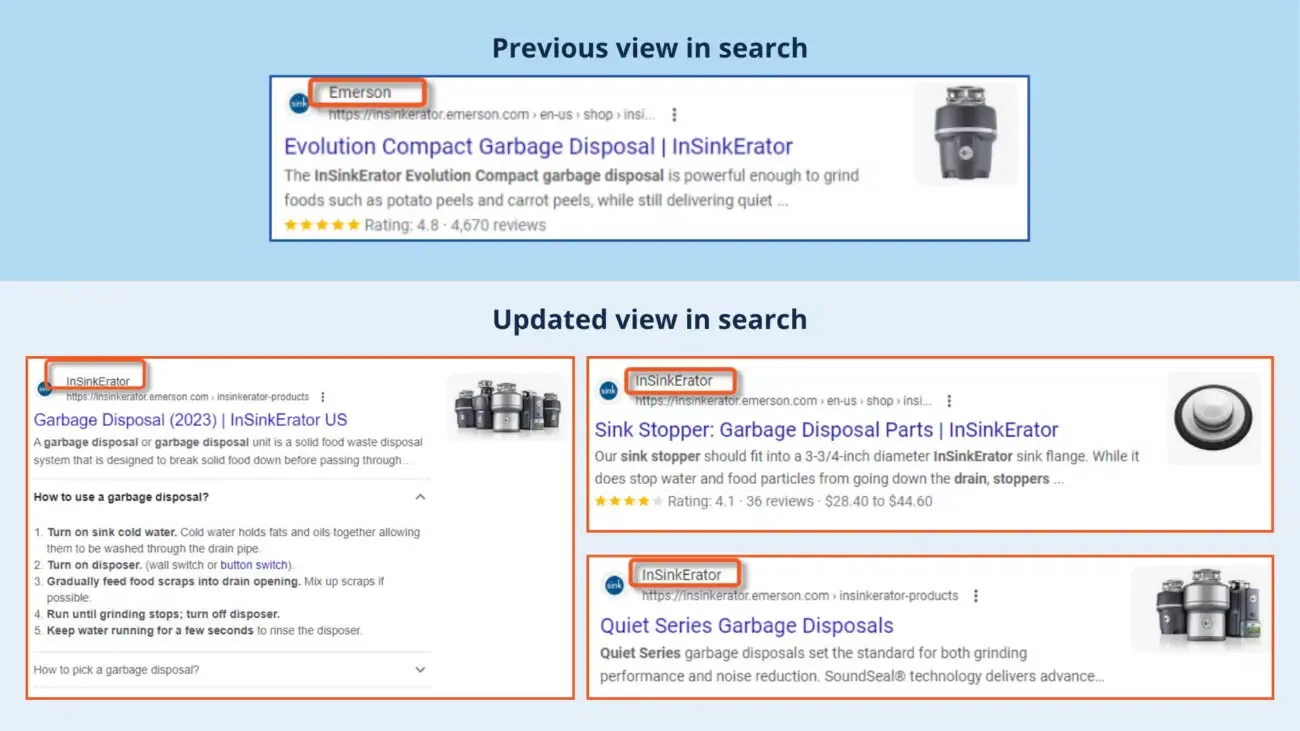
After implementing those changes, it reported a 69% increase in clicks, a 116% increase in impressions for non-branded product queries, and continued growth in AI-generated search visibility.
3. Write it in JSON-LD and validate before you publish
Google recommends implementing structured data using JSON-LD, a <script type="application/ld+json"> block that's separate from your page's HTML. It's easier to maintain than Microdata or RDFa and is supported across all major schema types.
How you generate the markup depends on your website:
- CMS plugins: If you're using WordPress, plugins like Rank Math and Yoast SEO can generate most schema automatically. Configure your Article schema with the correct author and publication dates, then add FAQ or HowTo schema where it's relevant.
- Manual or generated JSON-LD: For custom-built websites, use a schema generator, Google's Structured Data Markup Helper, or write the JSON-LD block yourself.
- AI-assisted generation: Provide tools like Claude or ChatGPT with the page's actual content and ask it to generate the appropriate markup—for example, Product + Offer + AggregateRating schema for a live product page, or Article schema for a published blog post.
If you’re using a tool like ChatGPT, always verify every field against the page before publishing, since AI can invent values or include properties that don't belong.
The most important rule is that your schema must exactly match the visible content on the page.
If your page doesn't display a price, rating, author, or FAQ, don't add those properties to your schema. Google treats misleading structured data as a spam policy violation and may ignore the markup or take manual action.
A controlled test by Search Engine Land highlights exactly why this matters.
Three nearly identical pages were compared:
- One used complete Article, FAQ, and Breadcrumb schema that accurately matched the page content
- One contained broken or mismatched schema
- One had no schema at all
Only the page with correctly implemented, content-matching schema appeared in a Google AI Overview and ranked third. The page with broken schema ranked in search but never appeared in an AI Overview, while the page without schema wasn't indexed.
So before publishing your schema markup:
- Run every page through Google's Rich Results Test.
- Validate the markup using the Schema.org Validator.
- Fix any errors or warnings before going live.
- Monitor structured data issues over time in Google Search Console's Enhancement reports.
To see what this process looks like in practice, let's generate and validate Article schema for this existing Surfer blog post:
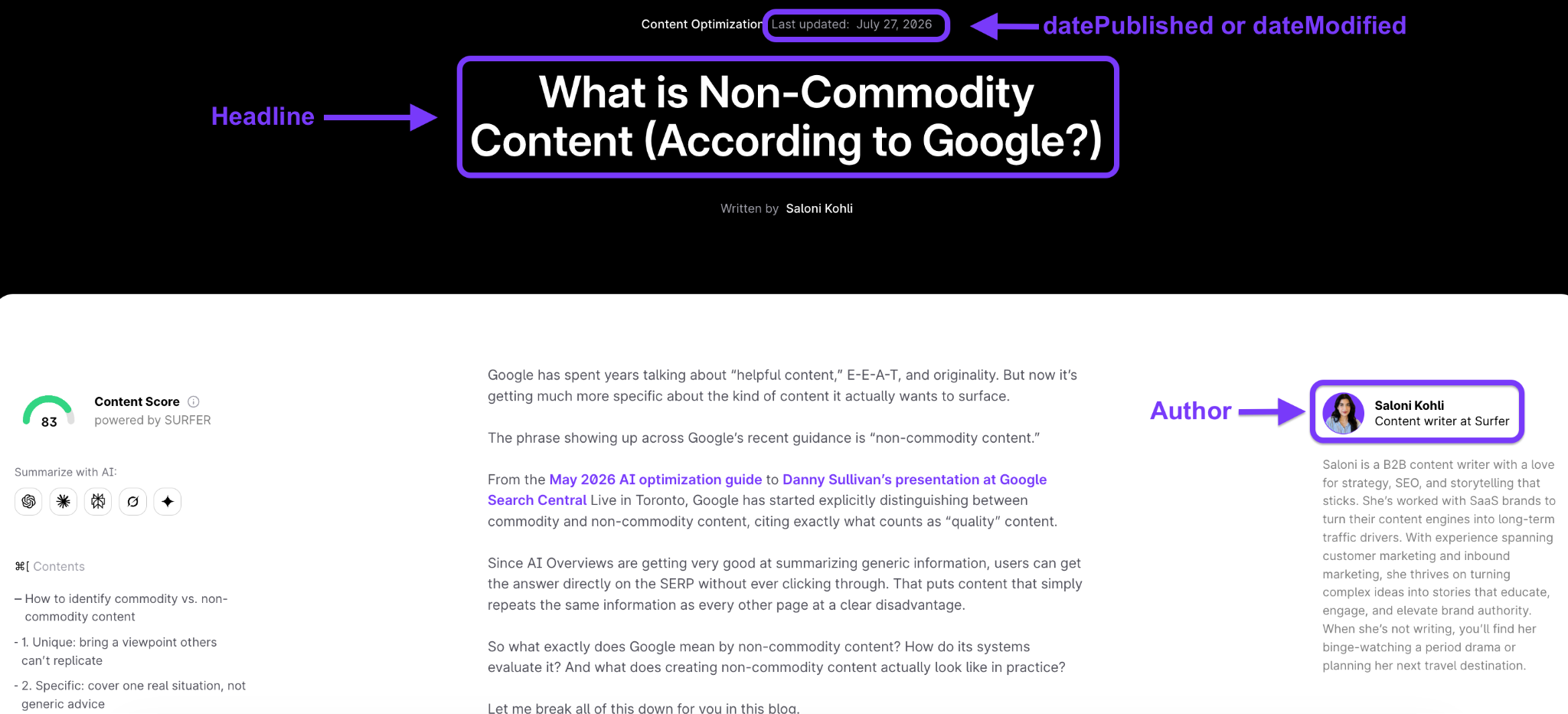
These visible page elements that are highlighted above will become the values in our Article schema.
Next, we'll generate the schema using AI or a schema generator. If you're using AI, paste the article PDF (or its URL if the tool supports it) and specify the schema type you want to create.
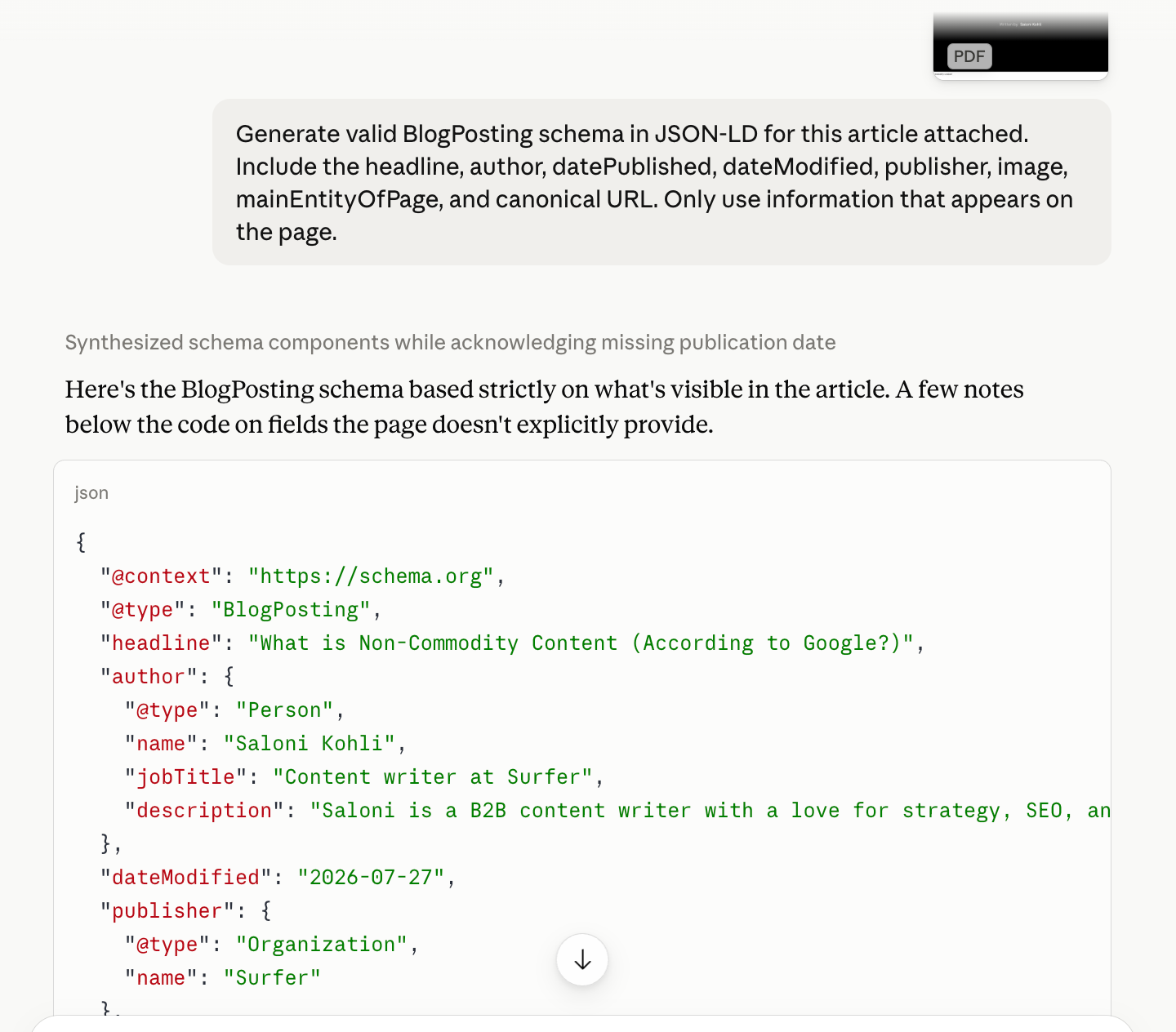
For example, you could use this prompt:
Generate valid BlogPosting schema in JSON-LD for this article. Include the headline, author, datePublished, dateModified, publisher, image, mainEntityOfPage, and canonical URL. Only use information that appears on the page.
Before using the output, verify that every property matches the article exactly. AI can sometimes invent values or include fields that aren't actually present on the page.
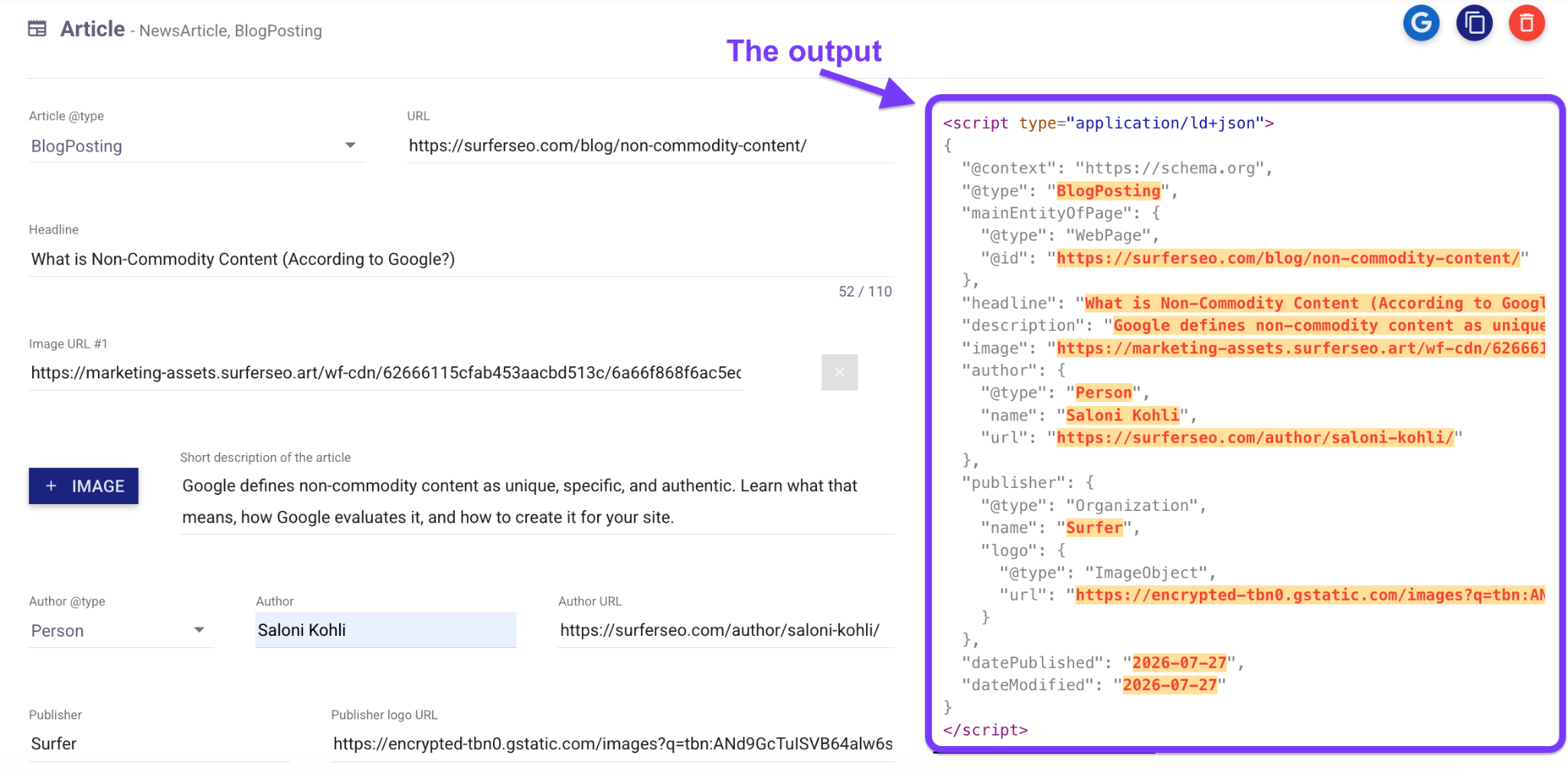
If you’re using a schema generator, you’ll manually enter fields that look something like this:
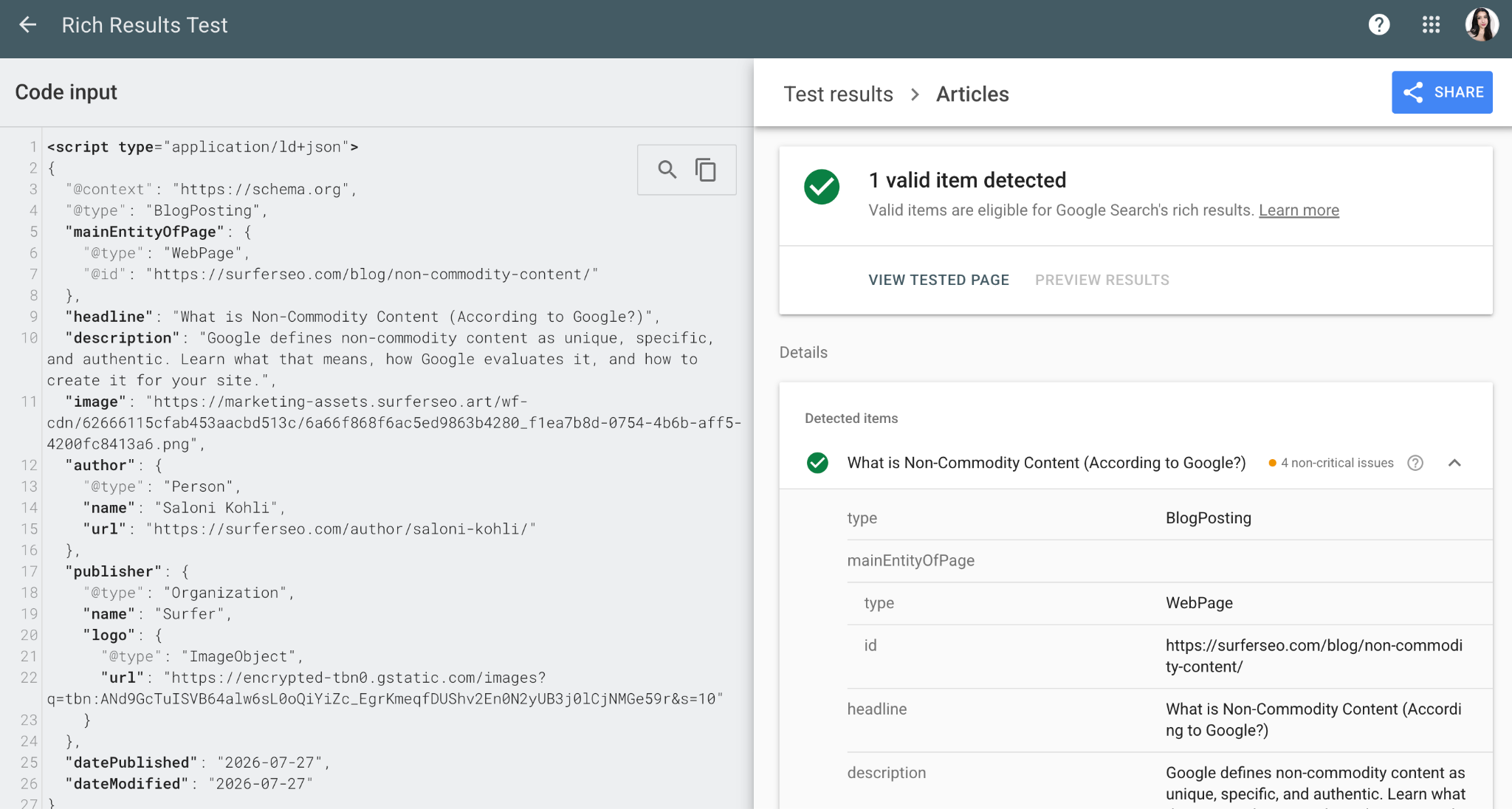
Finally, copy the generated JSON-LD into Google's Rich Results Test (or test the live URL if you've already implemented it) to confirm Google detects the correct schema type and reports no errors.
You can also run the same markup through the Schema.org Validator to check that it follows the Schema.org specification.
One ecommerce company on Shopify followed this workflow by implementing Product, BreadcrumbList, Organization, Article, and HowTo schema across its entire site before validating every page with Google's Rich Results Test.
After resolving implementation issues, product pages began earning rich results with star ratings and pricing, contributing to a 34% increase in click-through rate on rich snippet pages.
How to track whether schema is helping your AI visibility
Adding schema markup is the easy part. The harder question is whether it's actually improving your visibility in search results and AI-generated answers.
Schema doesn't guarantee higher rankings or more AI citations. What it does is give search engines and AI models cleaner signals to work with.
Whether those signals translate into visibility depends on everything else, too: your content, authority, and relevance.
A good place to start is with Google's own reporting tools.
In Google Search Console, check your Enhancements reports to make sure Google has detected valid schema and isn't reporting any implementation errors.
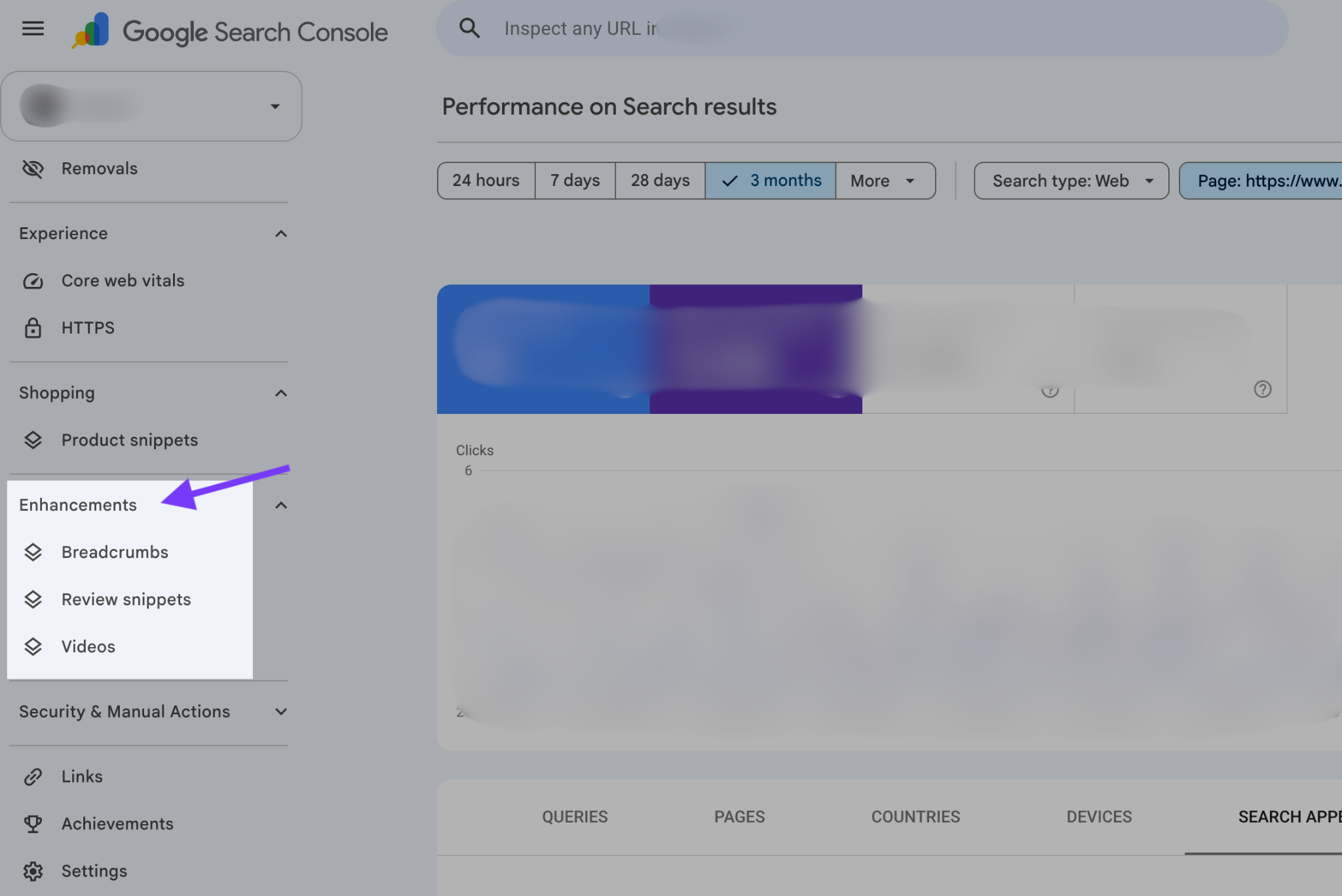
Then monitor the pages you've marked up to see whether they're earning rich results and whether those enhanced listings are improving click-through rates (CTR) and organic traffic.
Finally, when you look at page performance reports, set a filter through Search Appearance → AI Overview to identify which queries triggered an AI Overview and whether your URL appeared in the cited sources.
These reports are useful, but they're only part of the picture as they stop at traditional SEO and Google.
They won't tell you whether ChatGPT, Perplexity, Gemini, or Claude are citing your content, which pages AI models are pulling from or whether a competitor is consistently winning those citations instead.
That's why it's worth tracking AI visibility separately.
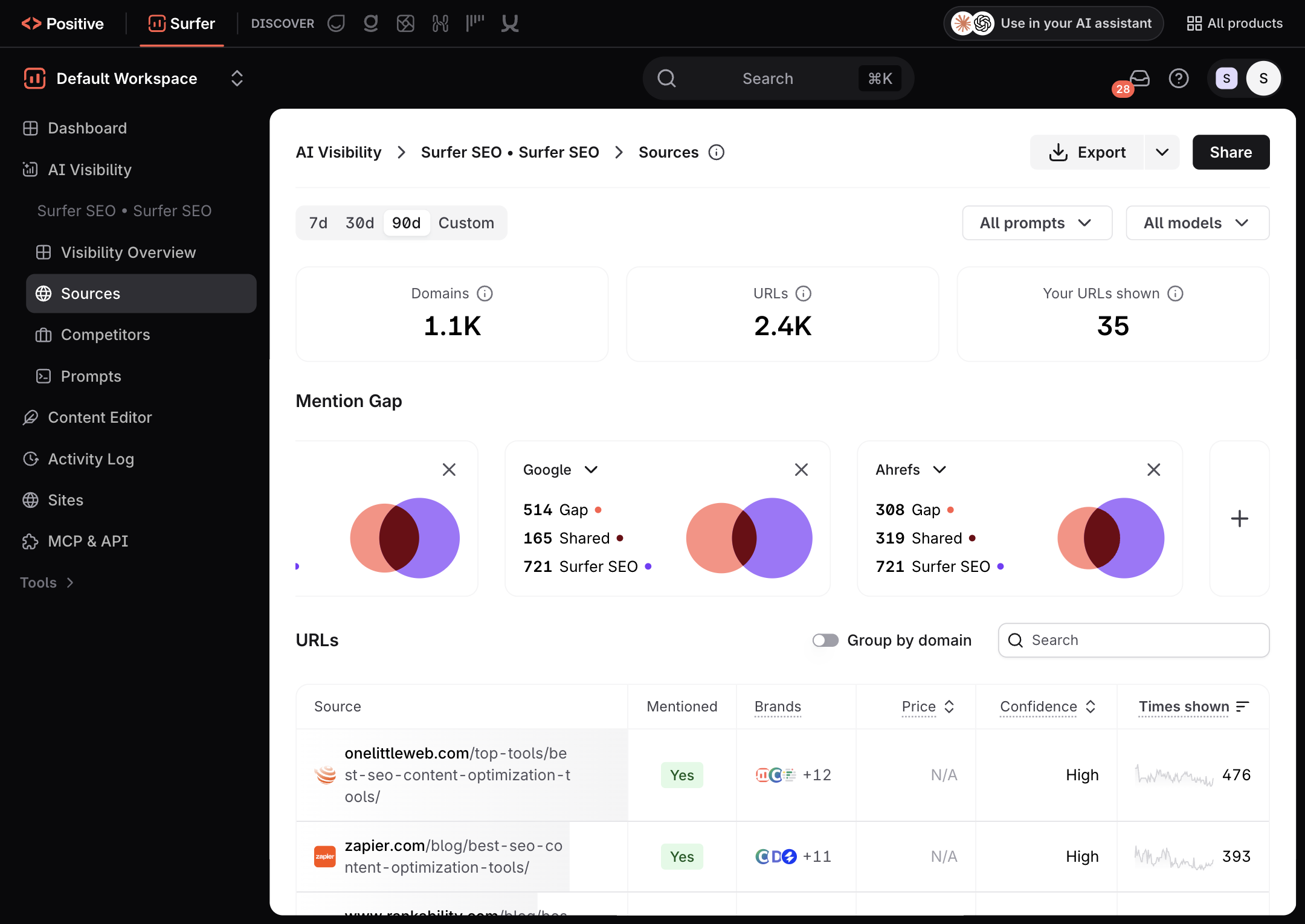
With the Surfer AI Tracker, you can monitor how your brand appears across multiple AI search engines after you publish and optimize content.
The Sources report shows which URLs AI models cite for your tracked prompts, along with a confidence score that reflects how consistently each source is referenced. It's an easy way to see whether your schema and content optimization efforts are actually leading to more AI citations.
The value of measuring becomes obvious once you have data.
HubSpot, for example, discovered that while its brand appeared frequently in AI answers, its own pages weren't being cited often enough. That insight changed its content strategy.
The team created awareness-stage resources, including an FAQ glossary covering common CRM, marketing, and sales terms.
As a result, citation share for those prompts increased by 60%, and across the wider program, HubSpot grew its AI citations by 433%. The takeaway isn't that schema alone produced those results—it’s that tracking citations revealed exactly where new content was needed.
Think of schema as one part of a feedback loop.
Implement the markup, publish the page, then check back a few weeks later. Make sure your structured data is still valid, monitor rich results and rankings in Search Console, and watch how AI citations change over time.
That’s why schema markup shouldn’t be taken as another one-time SEO task you can check off and forget. The real value comes from measuring what happens after you publish.
A simple workflow around this can look like this:
- Implement the right structured data for your page.
- Validate it using Google's Rich Results Test and Schema.org Validator.
- Publish and give search engines time to crawl the page.
- Monitor Search Console for rich results, AI Overview appearances, rankings, and CTR.
- Track AI citations across search engines to see whether your content is actually being referenced.
- Refine your content and schema based on what the data tells you.
Schema markup helps AI systems understand your content, but it's only one piece of the puzzle.
Pair it with high-quality, well-structured, authoritative content, strong topical coverage, and ongoing measurement, and you'll give your pages the best chance of earning visibility in both traditional SEO and AI-generated answers.
Does Google require special schema to appear in AI Overviews?
No. Google has clarified that it doesn't require any special structured data to appear in AI features. Your page needs to be crawlable, indexed, and eligible to show search snippets. Schema still helps Google understand your content and makes pages eligible for rich results.
Which schema types matter most for AI search?
Start with the primary schema that matches the page, such as Product for ecommerce pages or Article for blog posts, and fill every relevant property. In one 2026 study, Product and Review schema with real pricing, ratings and specifications were cited 61.7% of the time, compared with 41.6% for generic schema.
Is FAQ schema still worth adding?
Only when the page already has a genuine question-and-answer section that helps readers. Google dropped FAQ rich results from most search listings in May 2026, so FAQPage markup no longer brings the search visibility it once did, though it still marks up each answer explicitly.
Can schema markup hurt your search visibility?
Misleading schema can. Your markup must match the visible content on the page, because Google treats misleading structured data as a spam policy violation and may ignore the markup or take manual action. Don't add a price, rating, author or FAQ that the page doesn't show.
Does ChatGPT use schema markup?
OpenAI hasn't said so publicly. But ChatGPT's web search relies on Bing's search index, and Microsoft has confirmed it uses structured data to help its language models understand web content for Copilot. Improvements that help Bing understand your content can reach the pages ChatGPT retrieves and cites.